
People arrive at this question for very different reasons. Some are simply curious about privacy. Some suspect an employer. And some are worried about a partner, an ex, or a family member, which is a situation that needs different advice before any technical steps at all.
This guide covers how to tell if iPhone is being tracked. It starts with the safety point most articles skip entirely, then covers the five checks that reveal something real, and finally the signs that alarm people but usually mean nothing.
| Read This First If you think someone who could become angry or dangerous is monitoring you, do not start changing settings yet. Making changes often alerts the other person, and organizations that support survivors report that removal can escalate abusive behavior. It can also erase evidence you may need later. In the United States, the National Domestic Violence Hotline is available at 1-800-799-7233, and it is best contacted from a device you know is not being monitored, such as a friend’s phone or a library computer. There is no shame in reading the rest of this article and deciding to talk to someone before acting on it. |
Before You Change Anything
This section exists because well-meaning advice can put people in danger, and the organizations that work with survivors are clear about why.
The Safety Net Project at the National Network to End Domestic Violence puts safety before detection. Its guidance notes that some people escalate their behavior when monitoring is removed, that changes can alert the other person, and that they can also destroy evidence. An advocate can help you work out what is happening and plan what to do next, which is genuinely different from a checklist.
One more thing worth knowing. If someone has your Apple Account password, or physical access to your unlocked phone, they do not need to install anything at all. That is far more common than actual spyware, and it changes what you should be looking for.
| Do This First Think about what the person actually seems to know, and how they could have learned it. Knowing where you were is different from knowing what you texted, and each points to a different method. That pattern tells you more than any app scan, and it is something an advocate can help you think through. If you need to research this on a safer device, the Coalition Against Stalkerware keeps guidance written specifically for people in this situation. |
How to Tell If iPhone Is Being Tracked: Five Checks
These take about ten minutes together, and they cover the ways monitoring actually happens on an iPhone. Work through them in order, because the first one catches the most.
Check 1: Configuration profiles
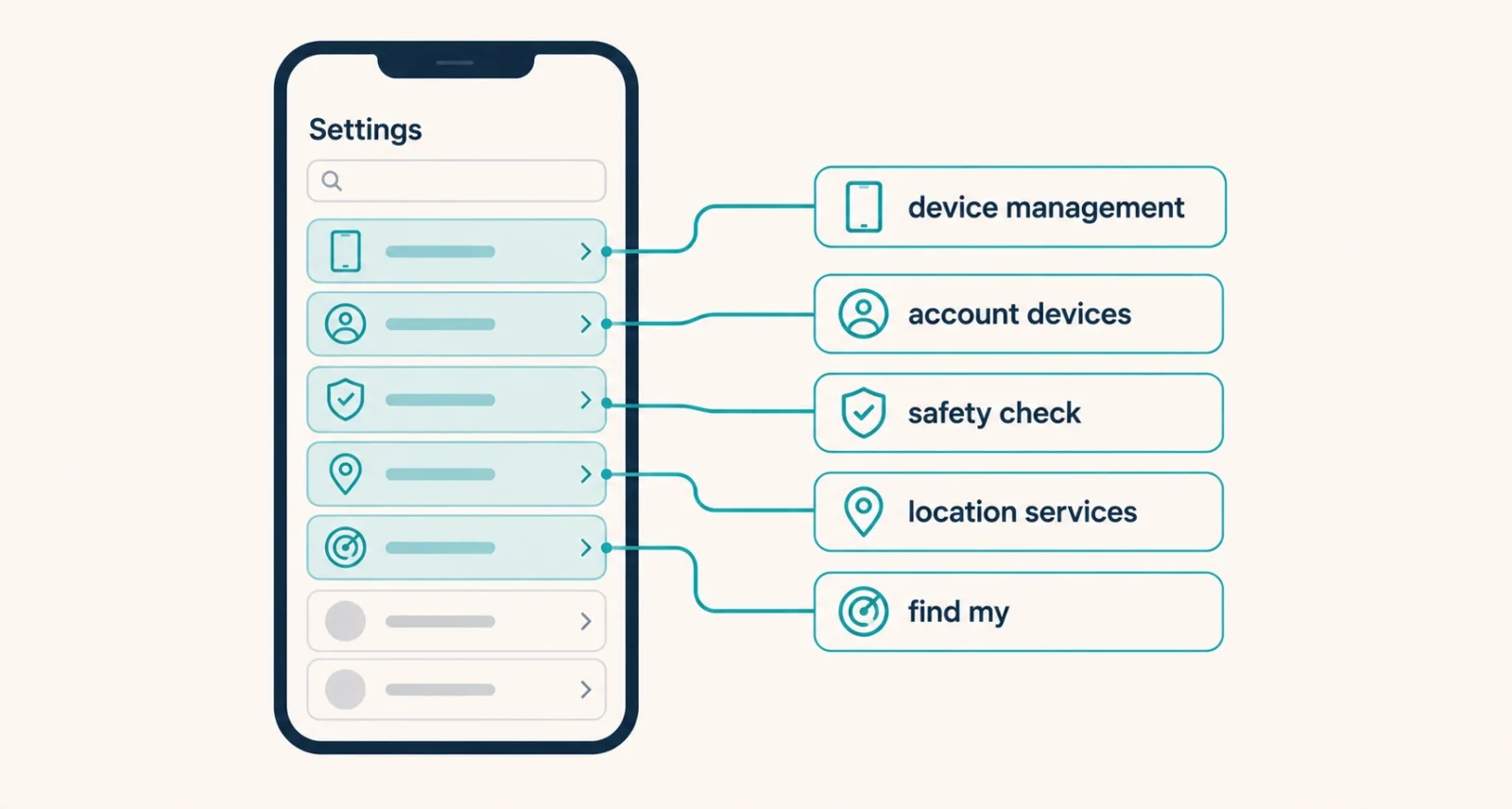
This is the strongest single signal on iOS and almost no consumer guide mentions it. Go to Settings, then General, then VPN and Device Management.
Apple built configuration profiles for company IT departments. They can route your traffic elsewhere, install certificates, and allow monitoring software that the App Store would never permit. Most consumer monitoring on iPhone works this way, precisely because Apple blocks the alternative. If that menu item does not appear at all, you have no profiles installed and you can stop worrying about this one. If a profile is there and you did not install it, and your employer did not give you the phone, that is worth taking seriously.
Check 2: Devices signed into your Apple Account
Open Settings and tap your name at the top, then scroll to the bottom. You will see every device signed into your Apple Account.
Anything you do not recognize can potentially reach your iCloud data, your photos, and your location. Tap a device you cannot account for and choose Remove from Account. Take a screenshot of the list first if you might need to show it to anyone.
Check 3: Safety Check
Apple built a tool for exactly this. Go to Settings, then Privacy and Security, then Safety Check.
It shows every person and app that has access to your information, including location sharing, shared photo libraries, and connected devices. Manage Sharing and Access lets you review those one at a time. There is also an Emergency Reset, which stops all sharing at once, signs you out of iCloud on other devices, and resets privacy permissions. That option is powerful and highly visible to anyone watching, so read the safety section above before using it.
Check 4: Location sharing and Location Services
Two separate things live here, and both matter. In Find My, check the People tab to see who you are sharing your location with. Family Sharing setups from years ago are a common surprise.
Then open Settings, then Privacy and Security, then Location Services. Look for apps set to Always rather than While Using, since those can report your position when you are not using them. Ask whether each app genuinely needs it.
Check 5: Unknown Bluetooth trackers
Your iPhone will alert you if an AirTag or compatible tracker that is not yours appears to be traveling with you. Those alerts appear in the Find My app, where you can make the tracker play a sound.
Check Find My rather than waiting for a notification, because alerts can be missed. Found a tracker in a bag or a vehicle and worried about who placed it? Photograph it where it sits before touching it.
What the Status Dots Actually Mean
Small indicators appear at the top of your screen, and they are more useful than most of the folklore around this topic.
| What You See | What It Means |
| Orange dot | The microphone is in use right now |
| Green dot | The camera is in use right now |
| Arrow icon | An app has used Location Services recently |
If a dot appears when you are not using anything obvious, swipe down from the top right to open Control Center. The name of the app that used it appears at the top. Usually it is something ordinary, such as a voice assistant or a camera app you left open. Occasionally it is not, and then you have a specific app to investigate rather than a vague worry.
Signs That Usually Mean Nothing
This section may save you more trouble than the checks above. Panic leads to bad decisions, such as wiping a phone that was never backed up.
| Common Worry | Usually the Real Cause | ||
| Battery draining faster | Aging battery, a background app, or a recent iOS update | ||
| Phone feels warm | Charging, heavy app use, or indexing after an update | ||
| An app you do not recognize | Many system apps ship with iOS and look unfamiliar | ||
| Noises on calls | Poor cellular signal, not interception | ||
| A text sent from your number | Number spoofing, which does not involve your phone at all | ||
| Higher data usage | Automatic backups, updates, or video autoplay | ||
| Worth Knowing Ignore the dial codes circulating online that supposedly reveal call forwarding or hidden monitoring. On modern iPhones and United States carriers they are unreliable, often return confusing results that mean nothing, and have caused plenty of unnecessary alarm. The five settings checks above tell you far more. | |||
What Real Monitoring Looks Like
Genuine signs tend to be specific rather than vague, and they usually involve knowledge rather than symptoms.
The strongest indicator is someone knowing things they should not, repeatedly and precisely. Not a general sense that they are keeping tabs, but details that only your phone could have supplied. Alongside that, look for four concrete things. An unexplained configuration profile, an unfamiliar device on your Apple Account, location sharing you did not set up, or an app holding Always location access without needing it.
Note what those have in common. Every one is a concrete finding you can point at, rather than a feeling. That distinction matters both for your own certainty and for anyone you may need to convince later.
If You Find Something
What to do next depends entirely on your situation, and there is no single right answer.
- If you have any concern about someone reacting badly, pause here and talk to an advocate before removing anything. That advice comes from the organizations that support survivors, not from caution for its own sake.
- Document what you found. Screenshots of profiles, device lists, and sharing settings are far more useful than a memory of what you saw.
- Change your Apple Account password from a device you trust, and switch on two-factor authentication if it is not already active.
- Update iOS, since security updates close routes that some monitoring relies on.
- Consider whether the phone itself needs replacing. For serious cases, a clean device is more reliable than trying to clean an existing one.
Where to Get Help in the US
These are the organizations with genuine expertise, and all of them are used to exactly this question.
| Organization | What It Offers |
| National Domestic Violence Hotline | Free, confidential support at 1-800-799-7233, 24 hours |
| NNEDV Safety Net | Detailed technology safety guidance and safety planning |
| Coalition Against Stalkerware | Guidance written specifically for people being monitored |
| Local victim services | In-person help and, where relevant, evidence handling |
Reach the hotline at thehotline.org or by phone, and read the technology guidance at techsafety.org. Both sites include quick-exit features for people who need to leave the page fast, and both recommend using a device that is not being monitored.
Ten minutes in Settings answers this question far better than any symptom checklist. Configuration profiles, account devices, Safety Check, location sharing, and unknown trackers cover how monitoring genuinely happens. Battery drain and warm phones almost never mean what people fear.
Frequently Asked Questions
How can I tell if my iPhone is being tracked?
Check five things in Settings. Look at General, then VPN and Device Management for configuration profiles you did not install. Tap your name to review devices signed into your Apple Account. Open Privacy and Security, then Safety Check, to see who has access. Review Location Services for apps set to Always. And check Find My for unknown Bluetooth trackers.
Can someone track my iPhone without installing anything?
Yes, and this is more common than spyware. If someone knows your Apple Account password, they can see your location, photos, and backups from their own device. Family Sharing and Find My location sharing also work without any app being installed. Check which devices are signed into your account and who you are sharing your location with.
Does a fast-draining battery mean my iPhone is being monitored?
Almost never on its own. An aging battery, a background app, or a recent iOS update explains it far more often. The same applies to a warm phone and higher data usage. Treat these as reasons to check your settings rather than as evidence, and rely on the specific checks instead.
What is a configuration profile and why does it matter?
It is a settings package that companies originally used to manage employee phones. Profiles can route your traffic, install certificates, and permit monitoring the App Store would not allow, which is why most consumer monitoring on iPhone uses them. Find them under Settings, General, VPN and Device Management. If that menu is absent, none are installed.
Should I remove monitoring software as soon as I find it?
Not necessarily, and this is important. Organizations supporting survivors warn that removing monitoring often alerts the other person, can escalate abusive behavior, and may erase evidence. If there is any chance of that, speak with an advocate first from a device you trust. In the United States, the National Domestic Violence Hotline is 1-800-799-7233.
Can my employer monitor my personal iPhone?
Only if you enrolled it, usually by installing a work profile to access company email or systems. Check Settings, General, VPN and Device Management. A work profile there is expected on a company phone and worth questioning on a personal one. Without a profile, an employer generally cannot monitor a personal device.

