
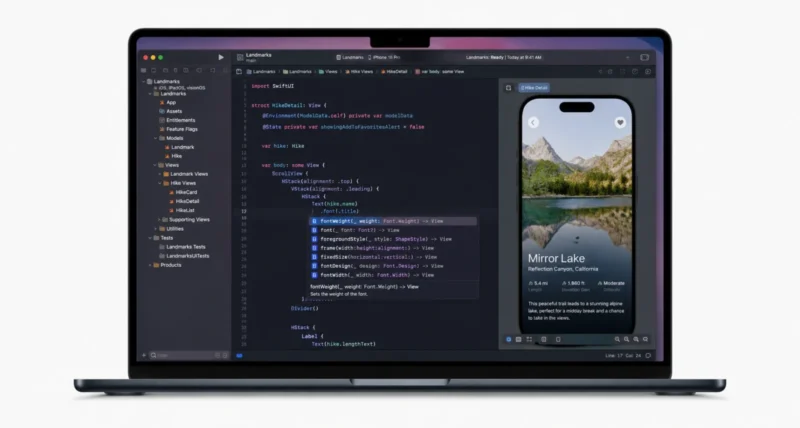
Apple just handed app developers their biggest toolbox upgrade in years. There are coding agents that work alongside you, on-device AI models you can drop into any app, and an Xcode that is leaner and faster. It is all here, and the betas are live today.
On June 8, 2026, Apple unveiled Xcode 27 plus a wave of new intelligence frameworks for building AI features. Here is a clear, no-jargon breakdown of what shipped, why it matters, and what you can try right now. Let us dig in.
The Big Picture at a Glance
Short on time? Here is the whole announcement in one view.
| Detail | What to Know |
| Announced | June 8, 2026, by Apple |
| Available now | Developer betas for Xcode 27 and all OS 27 versions, at developer.apple.com |
| Headline feature | Agentic coding in Xcode 27, with agents from Anthropic, Google, and OpenAI |
| For AI apps | A single Swift API for Foundation Models, plus a new on-device framework, Core AI |
| Model choice | Apple’s own models, or others like Claude and Gemini, via a new language model protocol |
| Nice perk | Small Business Program devs get Apple’s cloud models free, within limits |
1. Why This Update Is a Big Deal
Apple framed this as putting developers first. As Susan Prescott, Apple’s vice president of Worldwide Developer Relations, put it in the official announcement, the aim is to give developers the best tools so they can focus on bringing ideas to life.
In plain terms, two things changed in a big way. First, building AI features into an app is now far simpler, with one clean Swift interface and your choice of model. Second, Xcode itself can now act like a coding partner, planning, writing, and even testing code with you.
If you build for iPhone, iPad, or Mac, you can now add smart AI features with less code. You can also let an agent handle more of the grunt work inside Xcode. Both were much harder a year ago.
2. The Five Biggest New Tools
Here are the standout additions, each in a quick card so you can scan what matters to you.
| FRAMEWORK Foundation Models, Now One Swift API Building on last year’s launch, the Foundation Models framework is now a single native Swift API. It supports more powerful on-device models with image input, adds server models, and lets you build custom skills. Apple’s next-generation models here were built with Google and its Gemini models. |
| FRAMEWORK Core AI for On-Device Models Core AI is a brand-new framework, designed as the best way to run models on device. It is optimized for the unified memory and Neural Engine of Apple silicon. That means you can deploy full-scale large language models locally, right on the Mac or device. |
| XCODE 27 Agentic Coding With Top Models Xcode 27 brings coding agents from Anthropic, Google, and OpenAI into your workflow. You get interactive planning, multiturn question and answer, and a canvas that renders Markdown and shows code changes and previews side by side. |
| XCODE 27 Agents That Check Their Own Work Crucially, agents can now check their own output, so they run longer on their own. They write and run tests, try ideas in isolation with Playgrounds, confirm visual changes with previews, and drive the simulator through the new Device Hub. |
| MODEL CHOICE Bring Your Own Model You are not locked in. Through a new language model protocol, you can plug in Apple’s models or others like Claude and Gemini, or any provider that supports the protocol. Dynamic Profiles even let you change how a model behaves in your app on the fly. |

3. The Free Models Perk Worth Knowing
This one is a genuine gift for indie and small teams. Apple is making its cloud AI accessible at no API cost for qualifying small developers.
- If you are in the App Store Small Business Program with fewer than 2 million total first-time downloads, you qualify.
- You can use Apple’s next-generation Foundation Models running on Private Cloud Compute.
- There is no cloud API cost for that access, which lowers the barrier to building AI features.
Why This Matters: Cloud AI bills are often what stops a small developer from shipping an AI feature. Removing that cost for qualifying small teams is a real, practical leg up for indie apps.
4. A Leaner, Faster Xcode
Beyond the AI smarts, Xcode 27 is simply better as an app. The headline improvements are easy to appreciate.
- It is now Apple silicon only, 30 percent smaller, with faster performance and simpler setup.
- It is more personal, with a fully customizable toolbar and a new theme system that colors the whole editor.
- Plug-ins let you add custom skills, bring in tools via the Model Context Protocol, and connect any agent that supports the Agent Client Protocol.
- GitHub and Figma are the first to offer seamless one-step setup with Xcode.
- Xcode Cloud is now up to twice as fast, and adds support for Metal apps and visionOS builds.
5. Design and Language Upgrades
Apple also refined how apps look and how you write them.
Liquid Glass Gets a Transparency Slider
The Liquid Glass design continues to evolve, with better legibility, customizability, and consistency. A new transparency slider in Settings lets users dial the look to their taste, and it adapts to accessibility settings automatically.
SwiftUI and Swift 6.4
SwiftUI now makes apps more responsive with no code changes, thanks to more efficient state setup and faster layout. New reorderable containers mean less custom code, and a new Spatial Preview framework streams 3D models from Mac apps to Apple Vision Pro. Swift 6.4 smooths daily work with targeted warning suppression, a simpler anyAppleOS availability attribute, and clearer compiler messages.
6. Big Wins for Game Developers
Game and spatial developers get a focused set of tools to ship faster and lighter.
- Managed Background Assets shrink install sizes by downloading only the language packs a player needs. A new Steam Asset Converter also helps adapt PC games for Apple platforms.
- Game Porting Toolkit 4 adds open-source skills for agents with Apple’s Metal best practices, cutting porting time.
- Official Unity plug-ins bring native StoreKit and Background Assets support into the Unity workflow, including in-app purchases.
- Reality Composer Pro 3 lets you build full spatial experiences in one tool, with Live Previews and Mac Virtual Display showing edits instantly.
7. How to Try It Today
Want to get hands-on right away? Here is the quick path.
- Head to developer.apple.com and sign in with your Apple developer account.
- Download the developer betas for Xcode 27 and the OS 27 releases you target.
- Note that Xcode 27 needs an Apple silicon Mac, since it is now Apple silicon only.
- Keep in mind Apple Intelligence features are available only in supported regions.
Heads Up: These are developer betas, meant for testing, not for your main machine or shipping apps just yet. Final releases will follow later in the year alongside the public OS 27 launches.
Frequently Asked Questions
What Is New in Xcode 27
Xcode 27 adds agentic coding with models from Anthropic, Google, and OpenAI, including interactive planning and a side-by-side canvas for code and previews. Agents can check their own work using tests, Playgrounds, and the new Device Hub. Xcode 27 is also Apple silicon only, 30 percent smaller, and faster.
What Are Apple’s New Intelligence Frameworks
Apple expanded the Foundation Models framework into a single Swift API that supports on-device models with image input, server models, and custom skills. It also introduced Core AI, a new framework for running full-scale large language models locally on Apple silicon devices.
Can I Use Claude or Gemini in My App
Yes. Apple added a new language model protocol that lets developers use models of their choice, including Claude and Gemini, or any provider that implements the protocol. You can also use Apple’s own next-generation Foundation Models through the same Swift API.
Is Apple’s AI Free for Developers
For qualifying small developers, yes. Those in the App Store Small Business Program with fewer than 2 million total first-time downloads qualify. They can use Apple’s next-generation Foundation Models on Private Cloud Compute at no cloud API cost. Other developers can still use their own models.
When Can I Download Xcode 27
Developer betas for Xcode 27 and iOS 27, iPadOS 27, macOS 27, watchOS 27, tvOS 27, and visionOS 27 are available now at developer.apple.com. These are beta builds for testing. Final public releases will arrive later in the year with the OS 27 launches.
Do I Need an Apple Silicon Mac for Xcode 27
Yes. Xcode 27 is now Apple silicon only, so it requires a Mac with an Apple chip. The change helped Apple make the app 30 percent smaller, with faster performance and a simpler setup compared to earlier versions.
What Is the Liquid Glass Transparency Slider
It is a new Settings control that lets users adjust the transparency of Apple’s Liquid Glass design to their preference. The design also adapts to accessibility settings automatically, improving legibility while keeping a consistent look across apps and platforms.
What Did Apple Add for Game Developers
Apple introduced several game tools. Managed Background Assets shrink install sizes, and a Steam Asset Converter adapts PC games. Game Porting Toolkit 4 adds agent skills for Metal, official Unity plug-ins bring StoreKit and Background Assets support, and Reality Composer Pro 3 builds spatial experiences.

