
Imagine handing your computer a goal instead of a list of clicks. You say “file this report” and an AI does the clicking, typing, and scrolling for you. That is the idea behind Gemini 3.5 Flash computer use, which Google announced on June 24, 2026. It turns Google’s fast, everyday AI model into one that can see a screen, reason about it, and take action across browsers, phones, and desktops.
| Quick Answer Google has built computer use directly into Gemini 3.5 Flash. It lets developers create AI agents that look at a screen through screenshots, understand the buttons and fields, then click, type, and scroll to finish a task. It works across browser, mobile, and desktop, scores 78.4 on the OSWorld-Verified benchmark, and ships with safety guardrails. It is available now through the Gemini API and the Gemini Enterprise Agent Platform. |
Key Takeaways
- Computer use is now built into Gemini 3.5 Flash, not a separate model like before.
- It can see, reason, and act across browser, mobile, and desktop
- It scores 78.4 on OSWorld-Verified, putting it level with top rivals on this test.
- Two safety features let businesses require approval for risky actions and auto-stop on attacks.
- Developers can start now via the Gemini API and the Gemini Enterprise Agent Platform.
What Is Computer Use in Gemini 3.5 Flash?
Computer use is a tool that lets an AI operate a screen the way a person does. Instead of only writing text back to you, the model can look at what is on screen, decide what to click, and carry out the steps to reach a goal.
Until now, this lived in a separate, standalone Gemini model. Google has now folded it directly into Gemini 3.5 Flash, its fast everyday model. As Google explained, developers can now use one model to build agents that see, reason, and act across platforms.
| Worth Knowing This is built for developers, not a button inside the Gemini chat app. It is a capability that companies and builders use to create their own AI agents, which then show up inside the apps and tools you use. |
If the term agent is new to you, our explainer on AI agents and how to use them covers the basics in plain language before you go deeper here.
How Does It Actually Work?
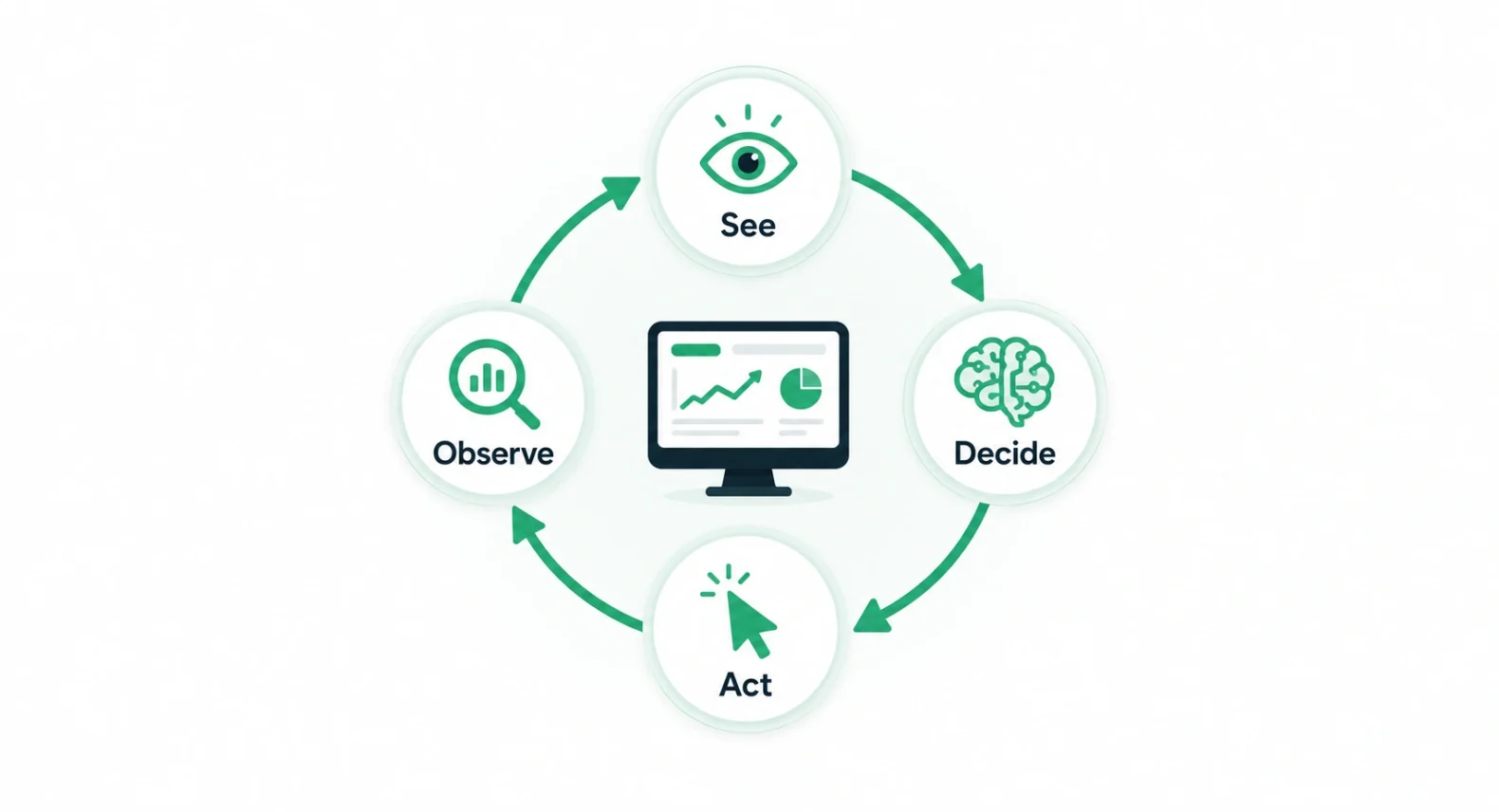
The process is a simple loop, repeated until the task is done. You give the agent a screen and a goal, and it figures out the actions on its own.
- See the screen. The agent takes a screenshot of the current screen to understand what is in front of it.
- Spot the parts. It identifies buttons, text fields, links, and other elements it can interact with.
- Decide the move. Based on your goal, it chooses the next action, such as a click, some typing, or a scroll.
- Take the action. The action runs, the screen changes, and the agent takes a fresh screenshot to see the result.
- Repeat until done. It keeps looping through see, decide, and act until the task is complete.
| The Cool Part Because the agent works from screenshots, it does not need special access to an app’s code. If a human can do the task by looking at the screen and clicking, the agent can attempt it too. |
Why Building It Into Flash Matters
Flash is Google’s fast, cost-efficient model. Putting computer use inside it means agents can act quickly and cheaply, which matters a lot when a task involves dozens of steps.
It also simplifies the build. What used to be a two-model setup, one for thinking and a separate one for screen control, is now a single model. Fewer moving parts usually means more reliable agents.
| The Standout This is the same model family that now powers parts of Google Search. Our guide to what AI Mode is in Google Search notes that AI Mode runs on a custom Gemini 3.5 Flash, so this is the engine behind features millions already use. |
What Can It Do? Real Use Cases
The point of computer use is long, repetitive work that eats human hours. Google highlights a few areas where it shines.
- Software testing. Agents can click through an app and check that features work, without a person stepping through every screen.
- Knowledge work. It can move across professional apps to gather data, fill forms, or file tickets.
- Form-heavy tasks. Repetitive data entry across web tools becomes something the agent handles in the background.
- Documentation checks. One team used it to audit their own docs for accessibility issues automatically.
How Does Google Keep Computer Use Safe?
Google uses a layered, defense-in-depth approach. It trained the model specifically to resist prompt injection, a trick where hidden instructions on a webpage try to hijack an agent. On top of that, it offers two optional safeguards for businesses.
| Safeguard | What It Does |
| User confirmation | Requires your approval before sensitive or irreversible actions |
| Auto-stop | Halts a task automatically if a prompt injection attack is detected |
Worth Knowing
Google still recommends combining these with secure sandboxing, human oversight, and strict access controls. An agent that can click anything needs guardrails, and the company is clear about that.
How It Compares to the Old Way
The shift from a standalone model to a built-in tool is the heart of this update. Here is the difference at a glance.
| Aspect | Old Standalone Model | New Built-In Flash Tool |
| Setup | Separate computer use model | One Gemini 3.5 Flash model |
| Speed and cost | Extra model overhead | Fast, cost-efficient Flash |
| Reach | Mainly browser | Browser, mobile, desktop |
| Benchmark | Earlier generation | 78.4 on OSWorld-Verified |
Who Is Already Using It
This is not just a demo. Google points to early customers putting computer use to work in real products, including automation companies like Browserbase, Browser Use, and UiPath.
That early traction matters. When automation specialists adopt a model, it signals the capability is reliable enough for real workflows, not just controlled demos. Expect more agent-powered features to quietly appear inside the apps you already use.
Gemini 3.5 Flash computer use is a clear step toward AI that does tasks, not just describes them. By folding screen control into a fast, affordable model, Google makes capable agents easier and cheaper to build.
The safety guardrails show the risks are real, and the early customers show the value is too. For anyone watching where AI is headed, this is one of the more practical moves of the year.
| Your Move Want more clear breakdowns of the AI tools shaping your day? Browse our Technology section for guides written for real people. |
Frequently Asked Questions
What is computer use in Gemini 3.5 Flash?
It is a built-in tool that lets the model see a screen through screenshots, understand its elements, and take actions like clicking, typing, and scrolling. Developers use it to build AI agents that work across browser, mobile, and desktop.
Can I use Gemini computer use in the chat app?
Not directly. It is a developer capability accessed through the Gemini API and the Gemini Enterprise Agent Platform. You experience it indirectly, through apps and agents that companies build with it.
What is the OSWorld-Verified benchmark?
OSWorld-Verified is an industry test that measures how well an AI navigates real operating systems and applications. Gemini 3.5 Flash scored 78.4, placing it among the leading models for agentic computer use tasks.
Is Gemini computer use safe to deploy?
Google trained the model to resist prompt injection and offers two safeguards: user confirmation for sensitive actions and auto-stop on detected attacks. It also recommends sandboxing, human oversight, and strict access controls.
How is this different from the older Gemini computer use model?
The capability used to live in a separate, standalone model. Now it is built directly into Gemini 3.5 Flash, which is faster and cheaper, and it reaches browser, mobile, and desktop rather than mainly the browser.
Where can developers start building with it?
Developers can access computer use through the Gemini API and the Gemini Enterprise Agent Platform. Google also points to a demo environment and a reference implementation to help builders get started quickly.

