

Back to school shopping should feel exciting, but between the dorm decor, the wardrobe refresh, and the endless supply lists, it usually just feels overwhelming and expensive. Here is the good news: your phone quietly became a personal shopper. The best back to school shopping tips this year are not about clipping coupons. They are about letting Google’s new AI tools do the hard part. From describing an outfit in everyday words to seeing a three-month price history before you buy, these six tricks feel a little like cheat codes. Here is how to use every one.
| The Short Answer The smartest back to school shopping tips for 2026 all use Google’s AI shopping tools. Describe exactly what you want to AI Mode in plain language, like “cozy sweaters under $80,” and get tailored ideas. Snap a photo of anything with Google Lens to find it online. Check a three-month price history and set a price-drop alert so you never overpay. Search “near me” to find items in stock locally. And use virtual try-on to see clothes on yourself before buying. Connecting apps like Gmail makes results more personal, though that stays your choice. Used together, these tools save real time and money. |
The 6 Back to School Shopping Tips at a Glance
Short on time? Here is the whole playbook in one table. Each trick is explained in full below.
| The Trick | What It Does for You |
| Shop by vibe with AI Mode | Describe what you want in everyday words and get tailored picks |
| Connect your apps | Personalizes results using your Gmail, Calendar, and Photos |
| Google Lens | Snap a photo of anything to find it or similar items online |
| Price history and alerts | Shows a three-month price trend and pings you when it drops |
| Nearby search | Finds items in stock close to you for same-day pickup |
| Virtual try-on | Lets you see clothes on yourself before buying |
Shop by Vibe and Budget, Not Just Keywords
Searching used to mean typing two words like “tote bag” and scrolling forever. Now you can talk to AI Mode in Search the way you would talk to a stylish friend. Describe the vibe, the use, and the budget all at once, and let it do the sorting.
As Google suggests, you can search something like “cozy sweaters that feel like a hoodie but look like I tried, for less than $80,” and get real options. You can also ask for the pros and cons of popular items, or get up to speed on something new. Not sure what you need to make matcha in your dorm? Ask, and you will get product ideas plus tips on what to look for in a dorm kettle.
Connect Your Apps for Scarily Good Picks
This is the trick that feels a little uncanny, in the best way. A feature called Personal Intelligence lets you securely connect apps like Gmail, Google Calendar, and Google Photos, so your shopping results reflect the real you rather than a generic shopper.
Here is how good it gets. Say you want a duvet cover for your dorm. If you have connected Gmail, Google can suggest covers that fit your mattress size and your style. It draws on your campus housing emails and past decor purchases. It is easy to see the appeal. A Google and Ipsos study found that 75% of college students want a personalized shopping experience built around their favorite brands, sizes, and styles.
| Worth Knowing This level of personalization means sharing more of your data with Google, so it is entirely your choice. You decide which apps to connect, and you can disconnect them whenever you want. If the tailored results are worth it to you, connect away. If you would rather keep things private, the other five tricks work perfectly well on their own. |
Snap a Photo of Anything to Find It
Google Lens turns the entire world into a shoppable catalog. Spot a cool vintage chair in a thrift store, or a friend’s comfortable new clogs, and you no longer have to guess where to buy one.
Just take a picture with Google Lens to learn about the style, find the same item online, or see it in a different color. It is brilliant for dorm decor and style inspiration alike, letting you chase down anything you see in real life without knowing a single brand name.
Never Overpay Again with Price History and Alerts
If you only steal one trick from this list, make it this one, because it is the biggest money-saver of the bunch. First-apartment and dorm essentials add up fast, so a quick price check before you buy can save you real cash.
Tap on a product listing to compare prices across different stores. Then click the three dots next to a merchant’s price to see a three-month price history that tells you whether today’s price is high, low, or typical. Not ready to buy yet? Tap “Track price,” and Google will alert you the moment it drops.
| The Golden Rule A “sale” is not always a real deal. Retailers raise and lower prices constantly, so a big red discount tag can still be a bad price. The three-month price history is how you cut through it. If the current price sits near the bottom of that range, buy. If it is near the top, set an alert and wait. |
Find Items In Stock Near You
Some things you need today, not in three to five business days. When you have just moved into your dorm and realize you forgot storage bins or a desk organizer, local availability beats fast shipping every time.
To find what is in stock close by, just add “near me” or “nearby” to your search. You can also look for the “nearby” label on product listings, or use the “Nearby” filter to see exactly what local stores have on their shelves right now.
Try Clothes On Without a Dressing Room
Want to try a new trend without the awkward dressing-room mirror? Virtual try-on lets you preview an outfit on your own body before it ever reaches your cart.
Click an item you like in Search, then tap the “Try it on” button. Select or upload a photo of yourself to see how the style looks on you. It is a genuinely useful way to judge fit and vibe, and it can cut down on returns. Just treat it as a helpful preview rather than a perfect mirror, since colors and fit still vary in real life.
The Smartest Way to Use All Six Together
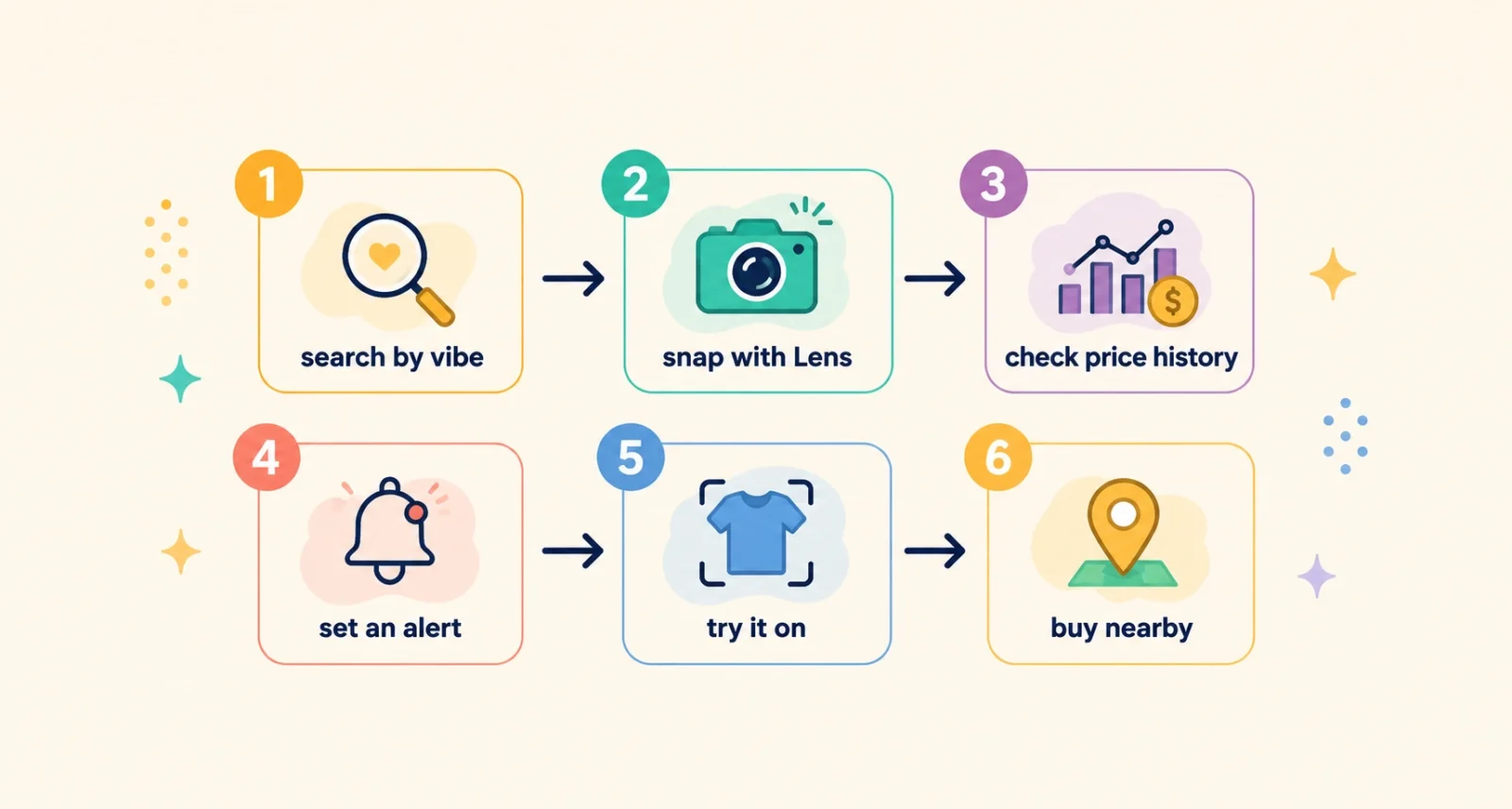
Here is the part most guides skip. These tricks are good on their own, but chaining them into one routine is where the real magic happens. Follow this order for almost anything on your list.
- Start with AI Mode. Describe the item by vibe, use, and budget to gather strong options fast.
- Use Lens for real-world finds. See something you love in a store or on a friend? Snap it and track it down.
- Check the price history. Before you commit, see whether today’s price is actually a good one.
- Set a price alert if needed. If the price is high, let Google watch it and ping you when it drops.
- Try it on virtually. For clothing, preview the fit and style on yourself before buying.
- Buy nearby for anything urgent. Need it today? Use a nearby search and pick it up locally.
A Few Honest Tips Before You Shop
These tools are powerful, but a little judgment keeps you in control. Keep three things in mind. Connecting your apps unlocks the best personalization, yet it is your call, and you can switch it off anytime. AI suggestions and virtual try-on are helpful starting points, not the final word, so still skim real reviews and size charts. And remember that the price history, not the discount sticker, is your most reliable guide to a genuine bargain.
Use them with that mindset and you get the best of both worlds: the speed of AI, and the confidence of your own good sense.
The best back to school shopping tips this year come down to one idea: let smart tools carry the boring parts so you can focus on the fun ones. AI Mode finds your vibe, and Lens hunts down anything you see. Price history keeps you from overpaying, nearby search saves last-minute runs, and virtual try-on skips the dressing room. Chain them together and shopping stops feeling like a chore.
Frequently Asked Questions
What are the best back to school shopping tips for 2026?
The smartest tips all use Google’s AI shopping tools. Shop by vibe and budget with AI Mode, snap photos to find items with Google Lens, and check a three-month price history with drop alerts. You can also search “near me” for local stock and use virtual try-on for clothes. Connecting apps like Gmail makes results more personal if you choose to.
How does Google AI Mode help with shopping?
AI Mode lets you search in full, detailed sentences instead of a couple of keywords. You can describe the style, purpose, and budget of what you want, ask for pros and cons, or get guidance on unfamiliar products. It then pulls tailored ideas from Google’s large catalog of products and offers, which makes finding the right item much faster.
What is Google virtual try-on and how do I use it?
Virtual try-on shows how clothing might look on you before you buy. In Search, click an item, tap the “Try it on” button, then select or upload a photo of yourself. It is a useful preview for judging fit and style, and it can reduce returns. Just remember that colors and fit still vary in person, so treat it as a guide rather than a guarantee.
How can I track a product’s price on Google?
Tap a product listing to compare prices across stores. Then click the three dots next to a price to see a three-month price history showing whether it is high, low, or typical. If you are not ready to buy, tap “Track price” and Google will alert you when the price drops. It is the easiest way to avoid overpaying.
Can Google Lens find where to buy something from a photo?
Yes. Point Google Lens at an item, or use a photo you have taken. It can identify the style, find the same product online, show similar options, or suggest different colors. It works well for dorm decor, fashion, and anything you spot in the real world but cannot name.
Is it safe to connect my apps for personalized shopping?
Connecting apps like Gmail is optional and controlled by you. It powers more personal recommendations, such as matching a duvet to your dorm mattress size, but it does mean sharing more data with Google. You choose which apps to connect and can disconnect them at any time, so weigh the convenience against your own privacy comfort.

