

Imagine asking an AI the same kind of question over and over, and each time it re-reads an entire instruction manual before answering. That is slow and expensive. Now imagine it simply remembers the manual and answers in a flash. That is the big idea behind Google’s latest upgrade.
This guide breaks down GKE Inference Gateway and its star trick, prefix caching, in plain, friendly language. No deep cloud knowledge needed. By the end, you will understand exactly how it makes AI apps faster and cheaper. Let us dive in.
The Short Version
Short on time? Here is the whole story in a nutshell.
| Question | Quick Answer |
| What is it | A smart traffic controller for AI requests on Google Kubernetes Engine |
| The key trick | Prefix caching, which lets the AI skip re-reading repeated text |
| Why it helps | Much faster replies, smoother streaming, and lower hardware costs |
| How much faster | Up to 92.8% shorter wait for the first word, in an independent benchmark |
| Who it is for | Teams running AI chatbots, coding assistants, and search on Google Cloud |
1. What Is GKE Inference Gateway, in Plain Terms
Let us start simple. When you run an AI model for lots of users at once, you need something to decide which computer chip answers each request. As Google explains on its official Cloud blog, the GKE Inference Gateway is that smart decision maker.
Think of it like a clever host at a busy restaurant. A poor host seats you at any random table. A great host seats you at the table whose waiter already knows your order, so your food arrives faster.
The Gateway works the same way. Instead of sending each AI request to a random chip, it sends it to the exact chip that is already prepared to answer it quickly.
Quick Take: Old way: spread requests evenly and hope for the best. New way: send each request to the chip best prepared for it. That small change makes a big difference.
2. The Problem It Solves
To see why this matters, you need to know one thing about how AI models work.
Every time you send a prompt, the model reads and processes all of it before replying. Say your prompt includes a huge chunk of fixed text, like a long set of instructions or a whole document. The model re-reads that same text every single time, which wastes time and burns expensive chip power.
- The repeated text gets processed again and again, even when it never changes.
- This adds delay before the first word appears, which users feel as lag.
- It also wastes costly GPU and TPU time, which drives up your bill.
Why It Matters: In real apps, most of a prompt is often the same every time, like a system instruction or a reference document. Reprocessing it on every request is like rereading a book's first 100 pages before every question.
3. How Prefix Caching Works, Step by Step
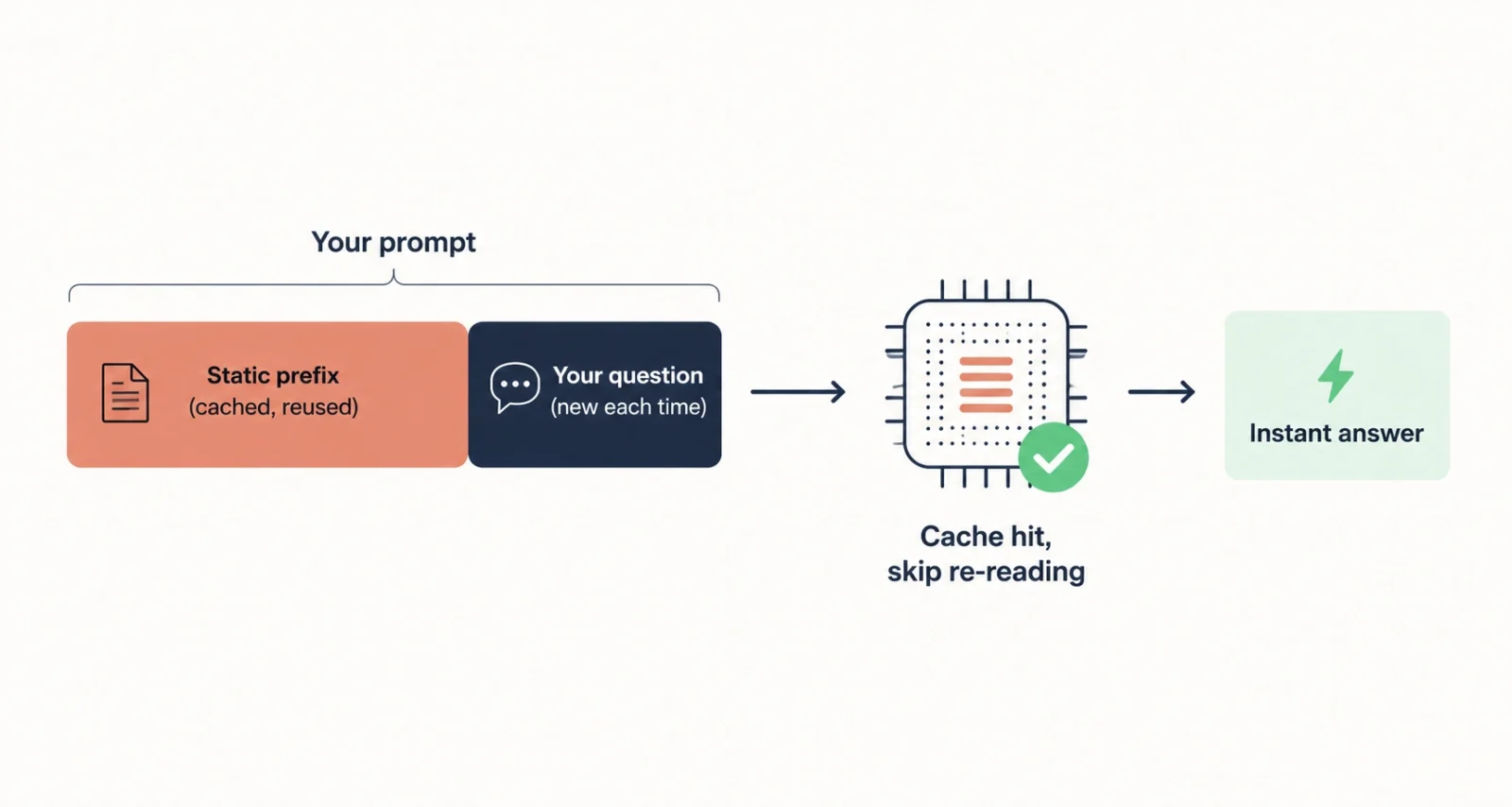
Here is the star feature, explained as a simple flow. Prefix caching means the model saves the work it already did on that repeated opening text, called the prefix.
- A user sends a prompt that starts with a long, fixed chunk of text, like an instruction set or a document.
- On that first run, the model processes the text and stores the result in memory, this saved work is the cache.
- A new request then arrives with the same opening text, but a different question at the end.
- Now the Gateway spots the match and routes the request to the chip that already holds that cached work.
- From there, the model skips re-reading the repeated part and only processes the new question, so the answer comes almost instantly.
The Simple Version: Your prompt's fixed part gets remembered once, then reused. The model only does fresh work on the bit that actually changed, your real question.
4. Two Real Examples You Will Recognize
Google shares two everyday use cases that make this click. Both reuse a big fixed prefix while only the user’s question changes.
Example 1: Asking Questions About Documents
Say a company has a giant manual or codebase, and staff keep asking questions about it. Normally the AI would re-read the entire manual for every question.
With prefix caching, the whole manual is kept warm in memory as a fixed prefix. The AI only reads your short question, then answers using the manual it already remembers. The big document never slows things down.
Example 2: Customer Service Chatbots
A support chatbot usually starts with the same rules every time, like its persona, tone, and company policies. That opening block is identical across millions of chats.
Prefix caching keeps those rules cached on the server, so the bot does not reprocess them for each message. The result is a chatbot that stays fast and responsive even during a rush.
Worth Knowing: Social media company Snap reported prefix cache hit rates of around 75 to 80 percent using this kind of routing, which means most requests skip the heavy repeated work.

5. The Proof: Real Benchmark Numbers
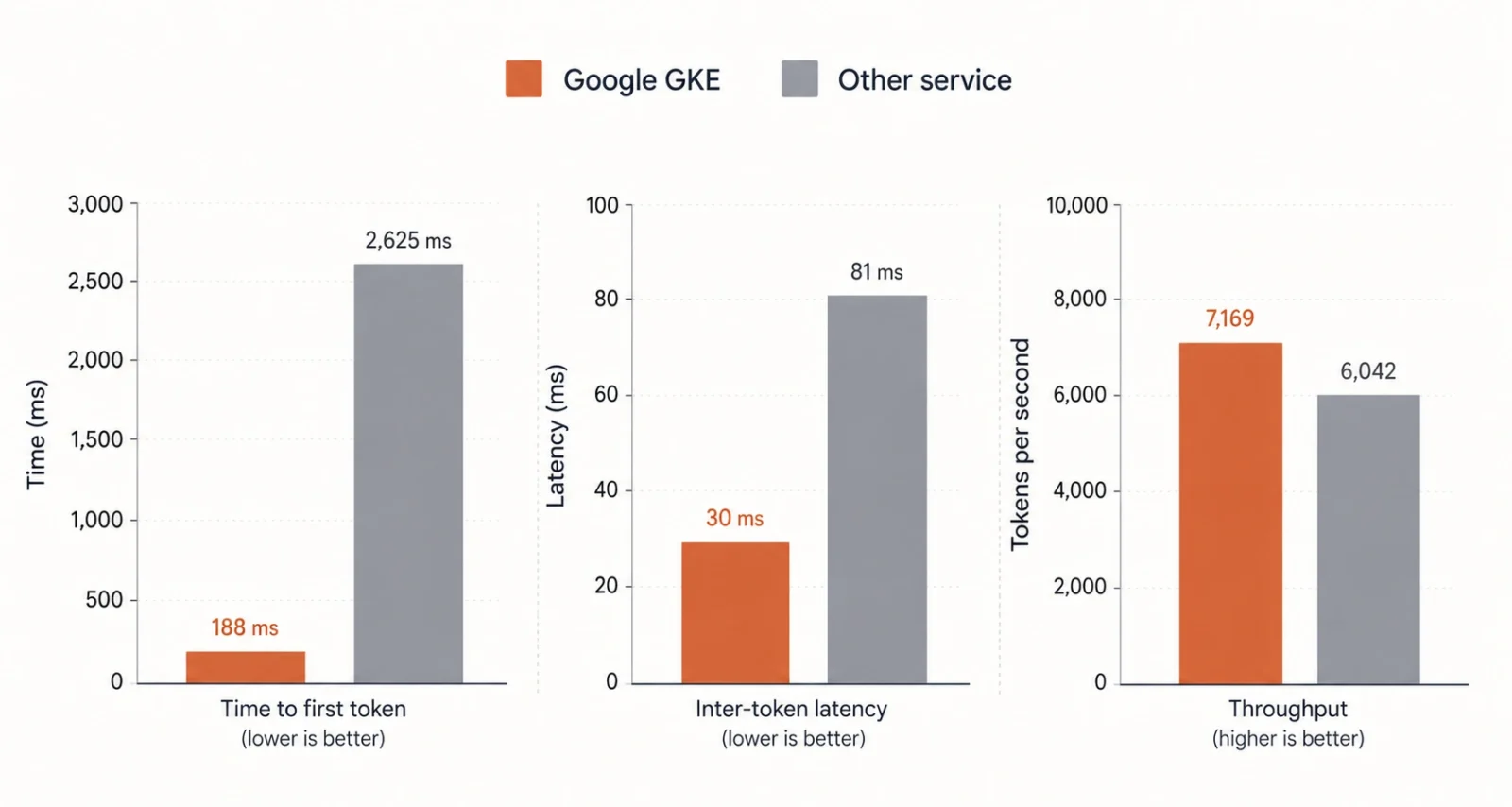
Talk is cheap, so here are tested results. An independent firm, Principled Technologies, compared Google’s setup against another managed Kubernetes service using the older round-robin method.
Both used identical hardware, eight NVIDIA A100 GPUs, on a Llama 3.1 8B model with a shared prefix workload. Here is how Google’s Gateway did.
| 92.8% shorter wait for the first word | 62.6% lower delay between words | 15.7% more words handled per second |
Here are the same results with the actual measured numbers, side by side.
| Measure | Google GKE | Other Service | Gain |
| Wait for first word | 188 ms | 2,625 ms | 92.8% faster |
| Delay between words | 30 ms | 81 ms | 62.6% lower |
| Words per second | 7,169 | 6,042 | 15.7% more |
The wait for the first word is the headline. Dropping from over 2.6 seconds to under 0.2 seconds is the difference between an app that feels sluggish and one that feels instant.
6. Who Should Care About This
You do not need to be a cloud engineer to benefit. This matters most if you build or run any of these.
- AI chatbots and virtual assistants that handle lots of users at once.
- Coding assistants that answer questions about large codebases.
- Document search and question-answer tools built on company data.
- Any real-time AI feature where a fast first response really matters.
Heads Up: Prefix caching helps most when your prompts share a large, repeated opening. If every prompt is short and totally unique, the benefit is smaller, though still real.
7. How to Explore It Yourself
Curious to try it or learn more? Here is a simple path to get started.
- Read Google’s official blog post to understand the feature and its benefits.
- Open the GKE Inference Gateway documentation for setup steps and requirements.
- Check the independent benchmark report if you want the full performance details.
- Plan your prompts so the fixed part comes first, which helps caching work best.
You can find the official documentation on the Google Cloud site, linked from the blog post above, when you are ready to set it up.
Frequently Asked Questions
What Is GKE Inference Gateway
GKE Inference Gateway is a smart routing tool for AI workloads on Google Kubernetes Engine. Rather than sending requests to random servers, it uses real-time data and prefix caching. That lets it route each request to the server best prepared to answer it quickly.
What Is Prefix Caching in Simple Terms
Prefix caching saves the work an AI model does on the fixed, repeated part of a prompt. When the next request starts with that same text, the model reuses the saved work. It then only processes the new question, which makes the reply much faster.
How Much Faster Is GKE Inference Gateway
An independent benchmark by Principled Technologies measured big gains. It delivered up to 92.8% shorter wait for the first word, 62.6% lower delay between words, and 15.7% higher throughput. That was against another managed Kubernetes service using older round-robin routing.
Why Is Time to First Token Important
Time to first token is how long a user waits before the AI starts replying. A shorter wait makes an app feel instant and responsive. The benchmark showed this dropping from over 2.6 seconds to under 0.2 seconds, a dramatic improvement for users.
What Problems Does Prefix Caching Solve
It solves the waste of an AI model reprocessing the same fixed text on every request. That repeated work adds delay and burns costly GPU and TPU time. Prefix caching skips it, cutting both latency and cost for prompts with shared content.
Who Should Use GKE Inference Gateway
Teams running AI apps on Google Cloud benefit most, especially chatbots, coding assistants, and document question-answer tools. It helps any real-time AI service where prompts share a large, repeated opening and a fast response matters.
Does Prefix Caching Work for Every Prompt
It helps most when prompts share a long, repeated prefix, like a system instruction or a document. If every prompt is short and completely unique, the benefit is smaller. Designing prompts with the fixed part first helps caching work best.
Is GKE Inference Gateway Hard to Set Up
It is built into the GKE Gateway as a native extension, so teams already using Google Kubernetes Engine can adopt it through configuration rather than a rebuild. Google provides official documentation with the setup steps and requirements.

