
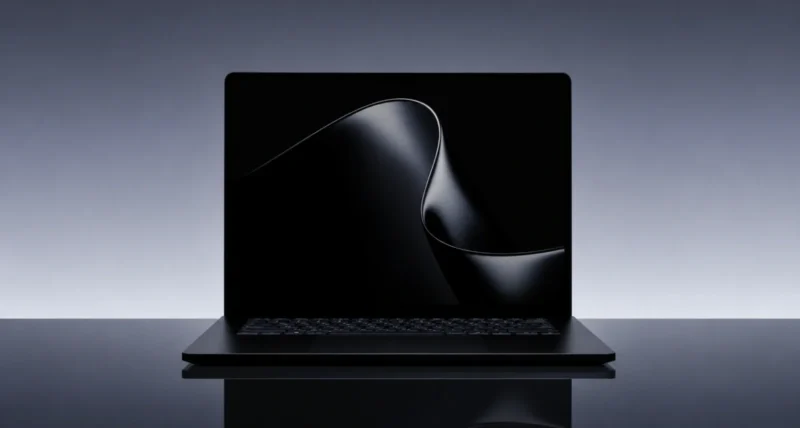
Microsoft just announced its most powerful Surface ever. The Surface Laptop Ultra, unveiled on May 31, 2026 alongside NVIDIA’s Computex keynote, is the first Surface built with NVIDIA RTX Spark inside, up to 128GB of unified memory, and a 2,000-nit mini-LED display. It is aimed squarely at creators, developers, and AI builders.
Corporate Vice President Brett Ostrum introduced it on the Microsoft Devices Blog as a laptop made for world makers, with the work-from-anywhere ambition of a creator workstation and the form factor of a thin-and-light Surface. In other words: serious power, still portable.
Here is the short version. Surface Laptop Ultra runs on the NVIDIA Blackwell RTX GPU with up to 128GB of unified memory and 1 petaflop of AI compute. It can run AI models with up to 120 billion parameters locally. The 15-inch mini-LED PixelSense Ultra display is the brightest Surface ever, at 2,000 nits peak HDR. It launches in fall 2026, comes in two finishes (Platinum and Nightfall), and has every port creators actually need. Below is the full breakdown.
1. What Is the Surface Laptop Ultra?
Surface Laptop Ultra is Microsoft’s new flagship laptop, sitting above the regular Surface Laptop and Surface Laptop Studio in the lineup. It is the first Surface designed from the silicon up with NVIDIA, specifically optimised for the new RTX Spark platform that Jensen Huang unveiled at Computex 2026.
If you want the chip side of the story, our NVIDIA RTX Spark Explained guide covers the superchip in depth. Surface Laptop Ultra is one of several launch partners for RTX Spark, alongside laptops from Dell, HP, ASUS, Lenovo, and MSI announced for fall 2026. What sets the Surface entry apart is the deep integration with Windows, since Microsoft built the laptop, the OS, and the chip partnership together.
Microsoft is positioning it for three audiences specifically: creators (filmmakers, photographers, 3D artists), developers (especially AI developers running large local models), and AI builders (researchers, agent developers, anyone running frontier-scale models on a laptop). The marketing language is world makers, but in plain English: people who need data-centre-class compute in a backpack.
2. Surface Laptop Ultra Specs at a Glance
Here is everything Microsoft confirmed on launch day, on a single page.
| Component | Detail |
| Display | 15-inch mini-LED PixelSense Ultra touchscreen, up to 2,000 nits peak HDR, 262 PPI |
| GPU | NVIDIA Blackwell RTX with 6,144 CUDA cores and full CUDA support |
| CPU + GPU package | NVIDIA RTX Spark superchip (Grace ARM CPU + Blackwell GPU) |
| Memory | Up to 128GB unified memory, dynamically allocated between CPU and GPU |
| AI compute | 1 petaflop (using FP4 with sparsity) |
| Local AI capability | Run models up to 120B parameters locally |
| Ports | HDMI, USB-C, USB-A, SD card, headphone jack |
| Touchpad | Largest haptic touchpad ever on a Surface |
| Battery | All-day battery life (Microsoft internal testing) |
| Finishes | Platinum and Nightfall |
| Operating system | Windows 11 |
| Availability | Later in 2026 (fall expected) |
| Price | Not yet announced |
3. What Makes It Different: NVIDIA RTX Spark Inside
The biggest single thing setting Surface Laptop Ultra apart from every other Surface is the chip. Instead of Intel or Qualcomm Snapdragon, Microsoft chose NVIDIA’s brand new RTX Spark platform. Three pieces matter.
128GB of unified memory
Unified memory means one big pool of RAM that both the CPU and the GPU can use, dynamically reassigned wherever the workload needs it. If you are editing 12K video, the GPU gets more. If you are running a large language model, the model can occupy almost the whole pool. No more juggling between system RAM and dedicated VRAM.
1 petaflop of AI compute
That figure is based on FP4 with sparsity, per NVIDIA’s own measurement. Practically, it is enough to run frontier-class AI models locally, on battery, on a laptop. Microsoft claims models up to 120 billion parameters fit in memory, which is data-centre territory until now.
Full CUDA support
This matters more than it sounds. CUDA is the software platform almost every AI tool, 3D renderer, video editor, and scientific computing application depends on. By choosing NVIDIA, Microsoft gave Surface Laptop Ultra immediate compatibility with the entire CUDA ecosystem. The Microsoft launch post calls this out specifically: AI creation, 3D rendering, and multi-model workflows can run simultaneously.
4. The 2,000-Nit Display That Stands Out
Microsoft calls the new screen the brightest display we’ve ever shipped, and the numbers back that up. Three highlights.
- 15-inch mini-LED PixelSense Ultra. Mini-LED gives contrast performance close to OLED while staying brighter and longer-lasting. Apple uses similar tech on the MacBook Pro Liquid Retina XDR; this is Microsoft’s answer.
- 2,000 nits peak HDR brightness. For context: most premium laptops cap around 500 to 1,000 nits. 2,000 nits means you can edit HDR video outdoors and actually see what you are doing.
- 262 PPI and high-precision colour accuracy. Pixel density is in the same range as the best MacBook displays, and Microsoft is targeting colour-grading-grade accuracy for creator workflows.
The 15-inch panel is also a touchscreen, in case you missed it in the spec table. Microsoft’s PixelSense brand carries through the Surface lineup, and the Ultra uses the most refined version of it yet.
5. Design, Ports, and Two New Finishes
Microsoft was deliberate about what Surface Laptop Ultra looks and feels like. The headline points:
Two Colour Finishes: Platinum and Nightfall
Platinum is the classic Surface silver-grey. Nightfall is the new darker option, similar in spirit to past darker Surface finishes but reworked for 2026. Microsoft has not released the exact undertone yet, but the marketing imagery shows it sitting somewhere between matte black and deep midnight.
Every Port Creators Actually Need
This is a real win and a quiet jab at Apple. Surface Laptop Ultra ships with HDMI, USB-C, USB-A, an SD card slot, and a headphone jack, all on the device itself. No dongles required for the basic stuff that creators and developers actually plug in. After years of Apple removing ports from MacBook Pro and then putting some back, Microsoft is making a clear product decision: a creator laptop should have the ports a creator needs.
Largest Haptic Touchpad on a Surface
Haptic touchpads (no moving parts, simulated click feel) are a creator-friendly upgrade because they click anywhere on the touchpad surface, not just at the bottom. Microsoft says this is the largest ever fitted to a Surface laptop, which should improve gestures and palm comfort during long edit sessions.
Built from the Inside Out
Microsoft made a point of saying mechanical, electrical, thermal, acoustic, materials, industrial design, and software engineers all sat together from day one. Translation: the chassis was designed around the chip’s heat output, not the other way around. The laptop runs quietly even under sustained AI workloads, which is the practical headline buried in that engineering talk.
6. Who Surface Laptop Ultra Is For
Microsoft’s marketing line is world makers, which sounds aspirational but actually maps to three concrete user groups.
Creators
Filmmakers cutting 4K and 12K footage, photographers running heavy editing in Photoshop and Lightroom, 3D artists in Blender or Maya, and motion designers in After Effects. The combination of mini-LED display, unified memory, and Blackwell GPU is the closest thing to a desktop workstation Microsoft has ever made portable.
AI Developers and Researchers
Anyone running large language models, fine-tuning vision models, or building local AI agents will care most about the 128GB unified memory and 1 petaflop of AI compute. Until now, doing this on a laptop meant compromise. Surface Laptop Ultra removes most of those compromises.
Software Developers (Especially the Heavy Ones)
If you compile large codebases, run multiple containers, or work with simulation-heavy workloads, the Ultra is positioned for you. Combined with the all-day battery and full port selection, it is a serious work-from-anywhere developer machine.
If you are a casual user: Surface Laptop Ultra is not the right Surface for you. It is built for people who need the kind of compute power most laptops cannot deliver. If your workload is mostly browser, email, Office, and the occasional video call, the regular Surface Laptop is far better value, both at purchase and over time.
7. Surface Laptop Ultra vs Other Premium Laptops
Microsoft has not announced pricing yet, but the device is clearly positioned in the same premium tier as Apple’s MacBook Pro and high-end creator laptops from Dell, HP, ASUS, and Razer. A quick comparison.
| Feature | Surface Laptop Ultra | Apple MacBook Pro 16 (2026) | Dell XPS 16 (2026) |
| Chip | NVIDIA RTX Spark (ARM + Blackwell) | Apple M5 Pro / M5 Max | Intel Core Ultra X7 358H (Panther Lake) |
| Discrete GPU | Yes (Blackwell RTX) | Integrated (Apple Silicon) | Integrated Intel Graphics |
| Max memory | 128GB unified | 128GB unified (M5 Max) | 32GB DDR5 |
| Display | 15-inch mini-LED, 2,000 nits | 16-inch mini-LED, 1,600 nits | 16-inch OLED, 400 nits |
| Touch screen | Yes | No | Yes (OLED config) |
| Ports | HDMI, USB-C, USB-A, SD, jack | Thunderbolt 5, HDMI, SD, jack | Thunderbolt 4 only, jack |
| Operating system | Windows 11 | macOS | Windows 11 |
| CUDA support | Yes | No | No |
| Release date | Fall 2026 | Available now | Available now |
The standout differentiator for Surface Laptop Ultra is the combination of 2,000-nit display, the only discrete NVIDIA GPU and full CUDA support of the three (Dell’s 2026 XPS 16 dropped the discrete NVIDIA option), and the broadest port selection. MacBook Pro 16 still wins on macOS ecosystem, Thunderbolt 5, and battery efficiency. Dell XPS 16 wins on availability today and OLED, but trails on memory ceiling, display brightness, and physical ports.
8. When You Can Buy Surface Laptop Ultra
Microsoft has confirmed Surface Laptop Ultra will be available later this year, with most analysts and OEM partners pointing to fall 2026 (October to November) as the launch window. Pricing has not been announced, but given the spec sheet and the audience, expect the entry configuration to start at premium territory, likely in the $2,500 to $3,000 range, with the maxed-out 128GB unified memory model significantly higher. You can learn more or sign up for updates at microsoft.com/ultra directly.
Worth holding off for: Independent reviews. As of June 2026, no third-party reviewer has had hands-on time with a retail Surface Laptop Ultra. Real-world battery life, thermal behaviour under sustained load, and actual app performance are still unknown. If you are spending this kind of money, wait for real reviews from the Verge, Tom’s Hardware, and Wired before committing.
Frequently Asked Questions
What is the Surface Laptop Ultra?
Surface Laptop Ultra is Microsoft’s new flagship laptop, announced May 31, 2026. It is the first Surface designed with NVIDIA’s RTX Spark superchip, includes up to 128GB of unified memory, a 15-inch 2,000-nit mini-LED display, and runs Windows 11. It is built for creators, developers, and AI builders who need workstation-class compute in a laptop form factor.
When will the Surface Laptop Ultra be available?
Microsoft has confirmed availability later in 2026, with fall 2026 (October to November) being the most likely launch window. Specific dates and pricing have not been announced yet.
How much will Surface Laptop Ultra cost?
Microsoft has not announced pricing. Industry expectations are that the entry configuration will start in the $2,500 to $3,000 range, with the maxed-out 128GB unified memory configuration significantly higher. Final pricing will be revealed closer to launch.
What chip does the Surface Laptop Ultra use?
It uses NVIDIA’s new RTX Spark superchip, which combines a 20-core ARM-based NVIDIA Grace CPU (developed with MediaTek) with a Blackwell RTX GPU, all on one package. Total AI compute is 1 petaflop, with up to 128GB of unified memory shared between CPU and GPU.
Can it run AI models locally?
Yes. Microsoft and NVIDIA confirm that Surface Laptop Ultra can run AI language models with up to 120 billion parameters locally, on device, without sending data to the cloud. This makes it one of the first consumer laptops capable of running frontier-class AI models offline.
What ports does Surface Laptop Ultra have?
HDMI, USB-C, USB-A, SD card slot, and a headphone jack, all built into the device. No dongles required for typical creator and developer connections.
What colours will Surface Laptop Ultra come in?
Two finishes: Platinum (the classic Surface silver-grey) and Nightfall (a new darker finish). Microsoft has not confirmed whether more colours will be added at or after launch.
Is Surface Laptop Ultra better than a MacBook Pro?
It is competitive at the high end. Surface Laptop Ultra wins on display brightness (2,000 vs 1,600 nits), CUDA software support, touchscreen, and port variety. MacBook Pro wins on macOS ecosystem, battery efficiency, and available-today status. The best choice depends on which operating system and software stack your workflow requires.
If you found this useful, you may also like our BitLocker recovery key guide for Windows 11.

