
Almost everything you have read about how to spot AI generated images is out of date. Count the fingers, they said. Look for melted text on the shop sign. That advice worked in 2023. Today’s models render hands cleanly and spell street signs correctly, so a perfect hand no longer proves anything at all. The good news is that better methods exist, and most of them are free, fast, and built into apps you already have. Here are the seven signs that still work, ranked by how much they actually prove.
First, the Bad News: 4 Signs That Stopped Working
Start here, because if you skip this you will keep using checks that now give you the wrong answer. The tells that every older guide teaches are precisely the ones the model makers fixed first.
| The Old Advice | Why It Fails in 2026 |
| Count the fingers | Current models render hands correctly almost every time |
| Look for garbled text on signs | Top models now spell on-image text accurately in the mid-90 percent range |
| Check for waxy, too-smooth skin | Realism tuning has largely closed this gap, pores and all |
| Look for weird teeth and ears | Fixed in the same wave of upgrades as hands |
The Global Investigative Journalism Network now warns reporters outright that hands are no longer a reliable signal. Those old giveaways, a six-fingered hand or a protest sign reading nonsense, have largely vanished. Treat a flawless hand as neutral information, not as proof of a real photograph.
| Test Yourself Educator Leon Furze runs a real or fake image quiz that hundreds of thousands of people have tried. Very few score full marks. If you think you can still eyeball this reliably, spend three minutes there first. It is a humbling way to understand why the rest of this article exists. |
How to Spot AI Generated Images: The 7 Signs That Still Work
I have ranked these deliberately, running from near-proof down to educated guesswork. Work top to bottom and stop the moment you have a confident answer. Most people do the opposite, squinting at pixels first and never checking the file, which is exactly backwards.
| # | The Sign | What It Proves | Time |
| 1 | Hidden SynthID watermark | Strong, near-proof of AI origin | 10 sec |
| 2 | Missing Content Credentials | Strong when present, weak when absent | 20 sec |
| 3 | No camera fingerprint in the file | Suggestive, not conclusive | 20 sec |
| 4 | The image has no past online | Strong context signal | 30 sec |
| 5 | Light and shadows disagree | The best remaining visual tell | 1 min |
| 6 | Background falls apart on zoom | Reliable on busy scenes | 1 min |
| 7 | Too clean to be a real photo | Weakest, use as a nudge only | 1 min |
Sign 1: The Invisible Watermark It Cannot Shake Off
This is the single best check available today, and it takes ten seconds. Google embeds an invisible watermark called SynthID into the images its AI produces, and you can read it by uploading the picture to the Gemini app and asking whether it was made with AI.
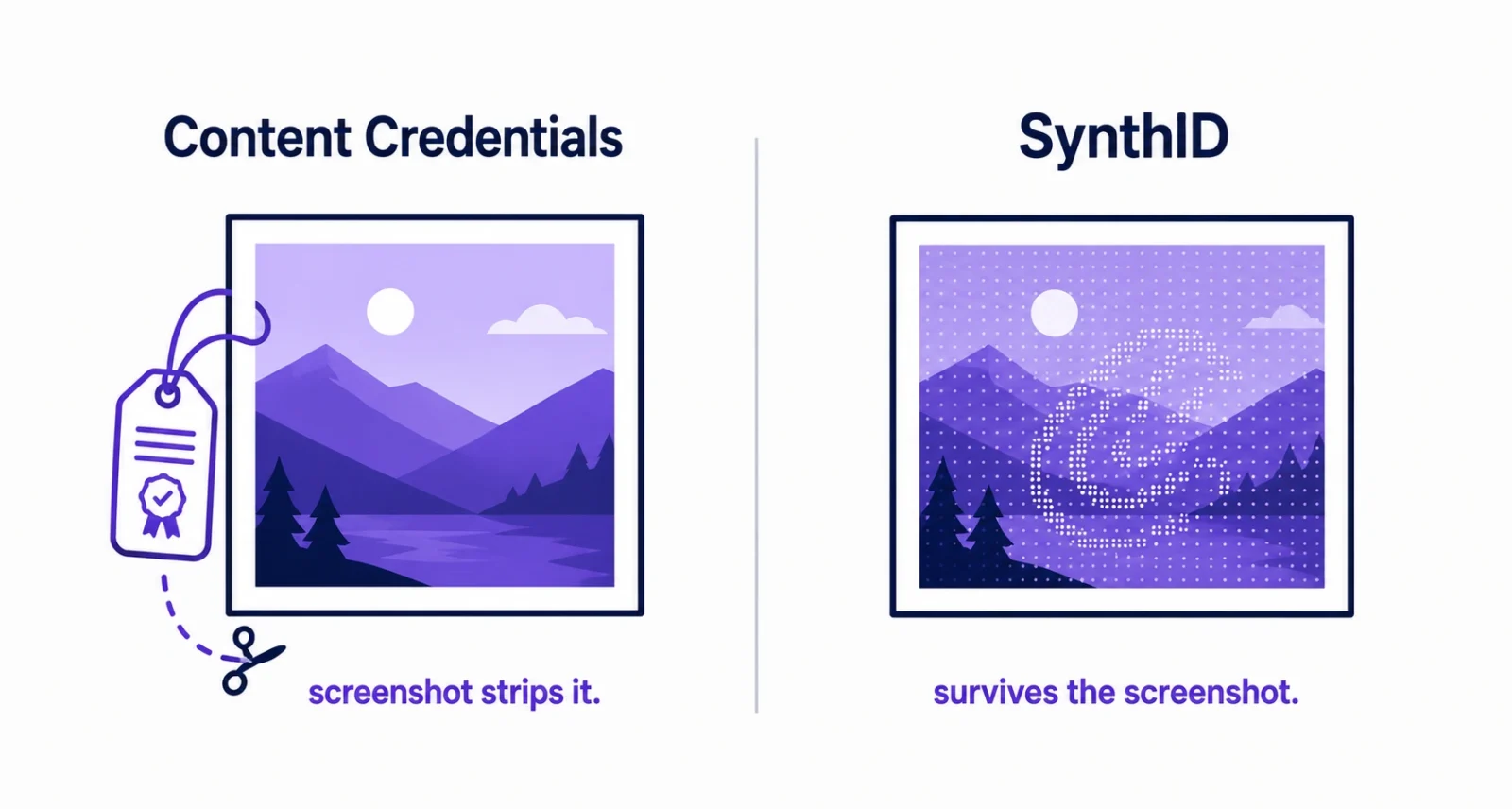
What makes SynthID special is where it lives. It is not a tag attached to the file, it is a subtle change to the pixel values themselves. Screenshot the image, crop it, resize it, and the watermark usually rides along. Google says it has now marked more than 100 billion images and videos this way, and the verification feature in Gemini has already been used 50 million times. Since May 2026, images from ChatGPT carry a SynthID signal too.
| The Catch Nobody Mentions Google’s own documentation is blunt about the limit: “Gemini can currently only recognize content created by Google AI tools.” So if Gemini finds no watermark, that does not mean the image is real. It means the image was not made by Google AI, and it could still have come from a different generator entirely. Read that twice, because most articles get it wrong. |
Sign 2: The Digital Passport That Should Be There
Content Credentials, built on the C2PA standard, work like a passport stapled to the file. The manifest records who created the image, which tool made it, and every edit since, all cryptographically signed. Adobe, OpenAI, Google, Canon, Sony and Leica all support it, and the Pixel 10 was the first phone to add credentials in its native camera app.
You can inspect them at gemini.google.com, and for anything you suspect came from ChatGPT, OpenAI’s own help pages point you to openai.com/verify. Here is the key difference from Sign 1, and it is worth understanding properly.
| Content Credentials (C2PA) | SynthID Watermark | |
| Where it lives | Beside the pixels, in the file wrapper | Inside the pixels themselves |
| Survives a screenshot | No, it gets stripped | Usually yes |
| What it tells you | Creator, tool, full edit history | Only that AI was involved |
| Who can read it | Any C2PA viewer, openly specified | Google tools only, proprietary |
Sign 3: The Camera Fingerprint That Is Not There
Every real photograph carries EXIF data: the camera make and model, the lens, the aperture, the shutter speed, the focal length, often the GPS coordinates. Generated images carry none of that. Open the file details on your phone or computer and look.
Treat this as suggestive rather than conclusive. Social platforms strip EXIF from genuine photos as a matter of routine, and anyone can fake metadata after the fact. Empty EXIF raises an eyebrow. It does not close a case.
Sign 4: The Image With No Past
Drop the picture into Google Lens or TinEye and see where else it lives. This remains the most useful thing you can do without any special tools.
A genuine news photograph turns up on real news sites, with dates, credited to a named photographer or agency. A fabricated one traces back to a meme page, an AI art forum, or nowhere at all. Context is the one tell nobody can strip out of a file, which is why Popular Science puts source-checking alongside the technical tools rather than beneath them.
Sign 5: Light That Comes From Two Places at Once
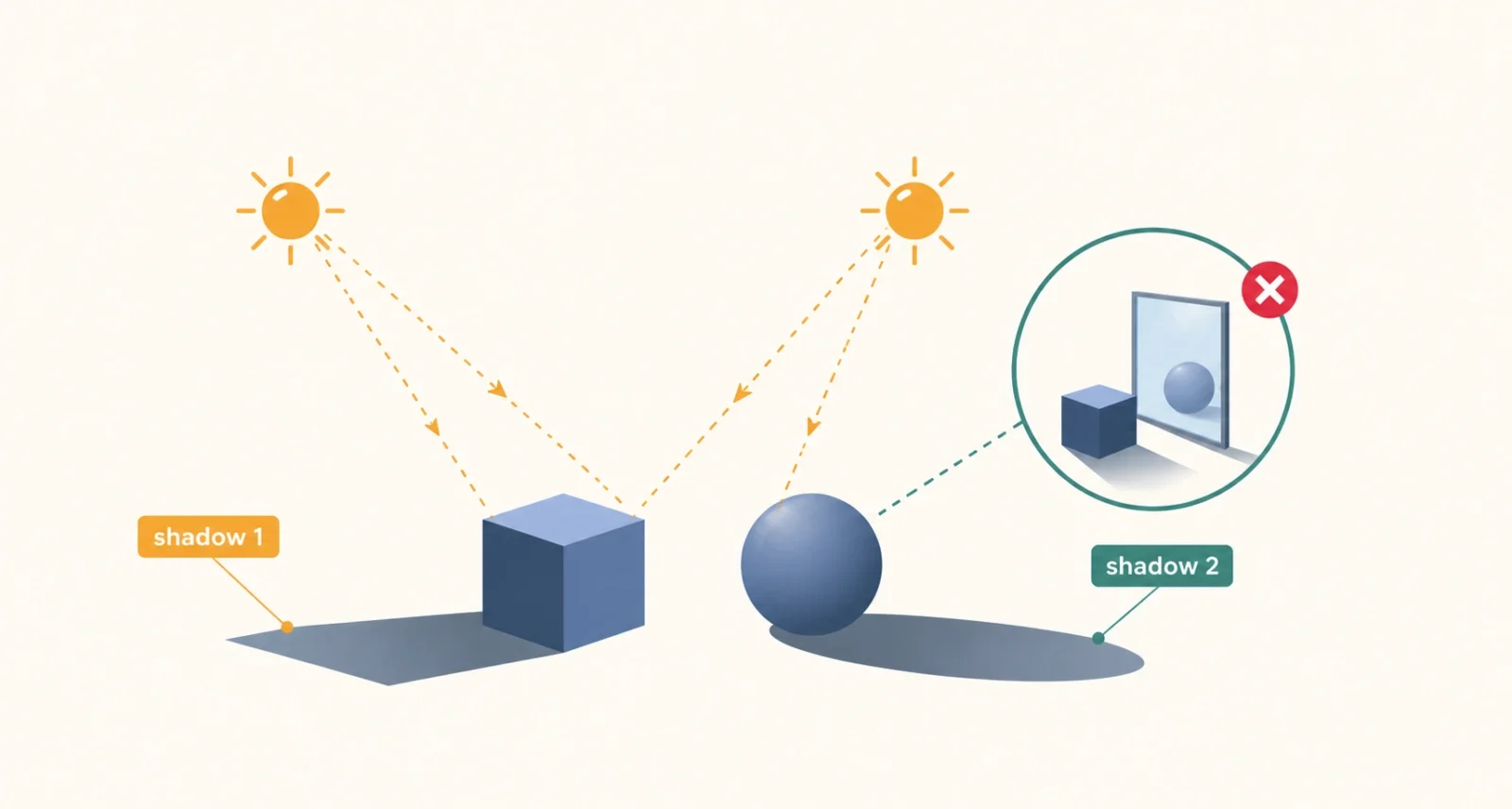
Now we reach the best remaining visual tell. Image models build a picture locally, patch by patch, and they are much worse at keeping the whole frame physically consistent. Lighting is where that cracks.
Pick a light source. Now check that every single shadow in the frame falls away from it, at the same angle. AI scenes routinely mix shadow directions that no real lighting setup could produce. Then check reflections, in mirrors, windows, water, sunglasses and even eyes. In real life, physics computes a reflection from the scene. A generated image merely guesses at it, and those guesses often disagree with whatever stands in front of the glass.
Sign 6: The Background That Falls Apart When You Zoom
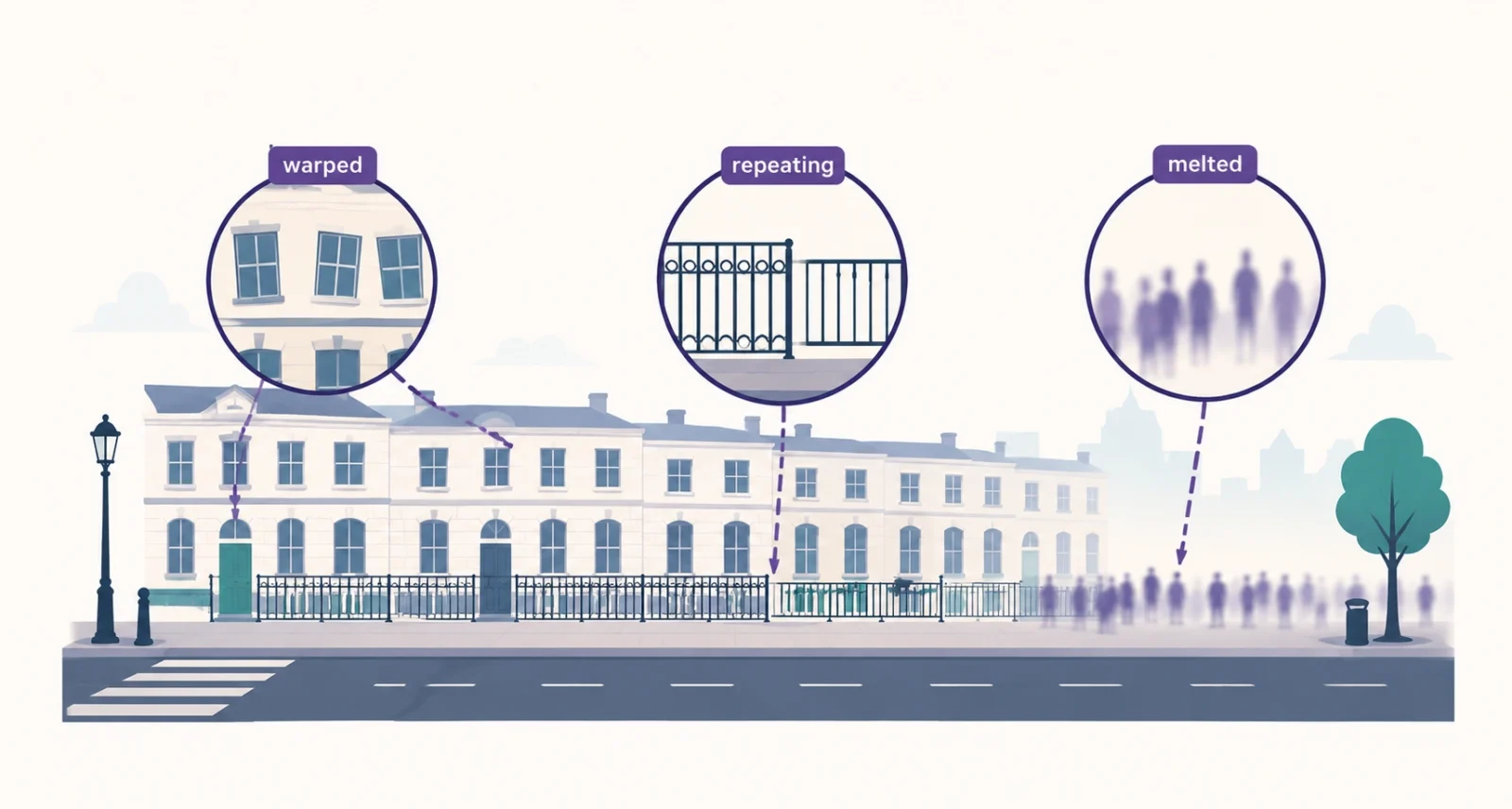
Models spend their effort on the subject. They get lazy at the edges of the frame, so zoom into the parts of the picture nobody expects you to examine.
Watch for architecture that warps or repeats, railings that change spacing halfway along, and crowds whose faces turn to mush in the middle distance. Look closely at the places where objects meet a person: spectacle arms that merge into a temple, necklace chains that vanish into skin, bag straps that appear on one shoulder and not the other, strands of hair that fuse into a solid mass. These joins are where generated images still come undone.
Sign 7: The Photo That Is Too Clean to Be a Photo
Real cameras have flaws. They produce sensor noise, slight lens distortion, colour fringing at high-contrast edges, a bit of motion blur, an awkward object poking into the frame. Real photographs contain accidents.
Generated images tend to have none. The grain is absent, the composition is immaculate, every element in the frame seems to be serving the subject, and the light is doing something flattering that light rarely bothers to do in life. This one is the weakest sign on the list, because a skilled photographer with good gear produces clean images too. Use it as a nudge to run the checks above, never as a verdict.
The 60-Second Routine
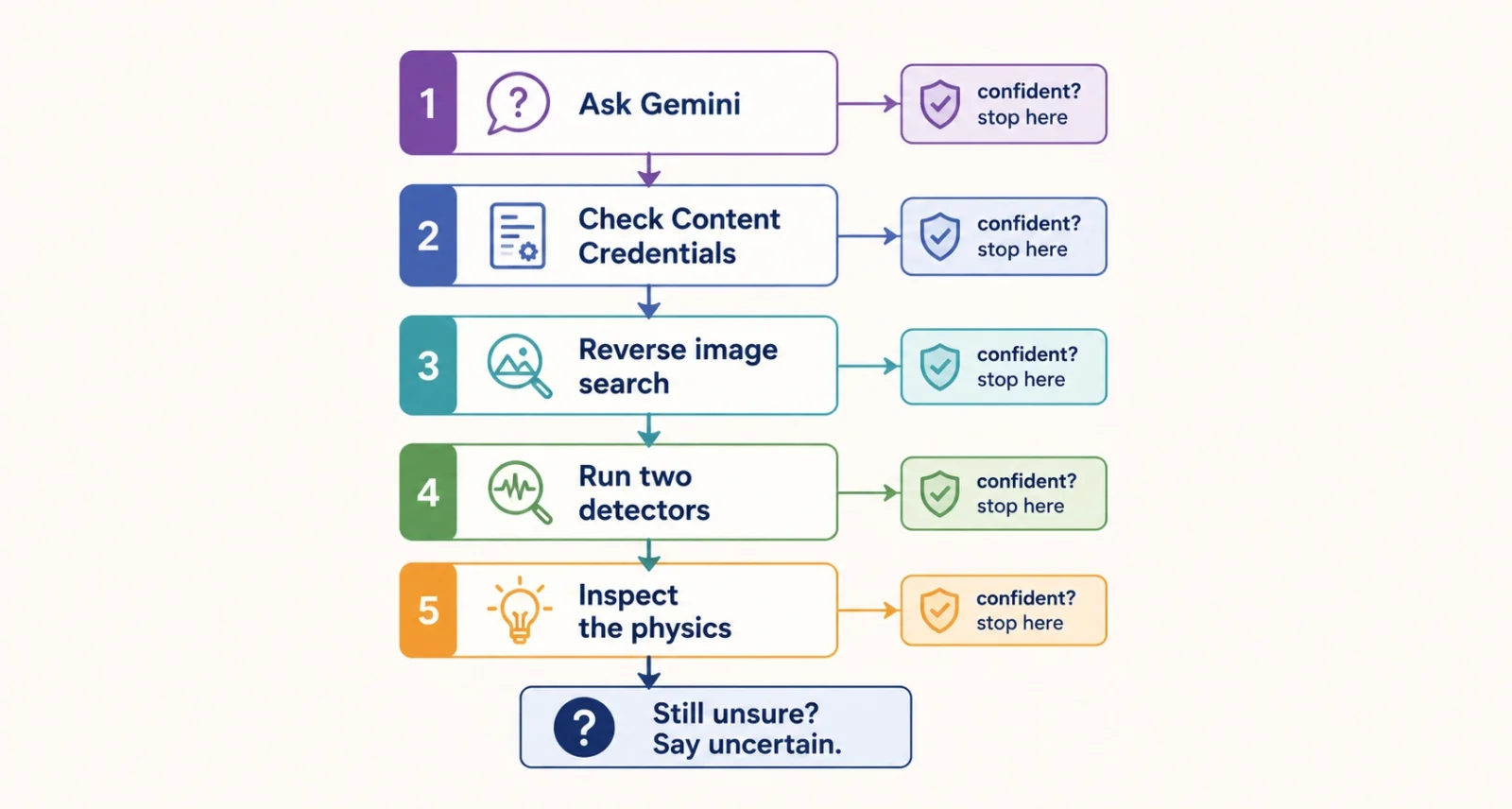
Here is the whole method, compressed. Climb the ladder and stop as soon as you are sure.
- Upload the image to the Gemini app and ask whether AI made it. If you suspect ChatGPT, use openai.com/verify instead.
- Check the Content Credentials for a signed record of the tool and the edit history.
- Run a reverse image search in Google Lens or TinEye. Ask where this picture first appeared, and who published it.
- Run it through two independent AI detectors, and trust their agreement rather than either score on its own.
- Only now, study the physics. Shadows, then reflections, then the background, then the joins between objects and skin.
- If the checks disagree, record the answer as uncertain. That is a legitimate result, and often the honest one.
Do AI Image Detectors Actually Work?
Partly, and the honest numbers matter. Independent 2026 benchmarks put Hive Moderation around 94 percent and Illuminarty around 91 percent on clean test images. Respectable, but not proof.
| What to Know About Detectors | The Reality |
| Best-in-class accuracy | Roughly 91 to 94 percent on clean images |
| On compressed or edited images | Accuracy drops, sometimes sharply |
| How many should you run | At least two, and weigh their agreement |
| How to read the score | As a lead worth following, never as a verdict |
Bear in mind that a great many detector websites exist mainly to sell you a subscription. The free, first-party checks in Sign 1 and Sign 2 are stronger evidence than most paid tools, and they cost nothing.
The One Mistake Almost Everyone Makes
This is the most important paragraph in the article, so here it is plainly. A missing watermark is not proof of a real photograph. A missing Content Credential is not proof of a real photograph.
Absence of evidence is not evidence of absence. A file can come back completely clean for three innocent reasons: a generator that does not watermark produced it, a social platform stripped the metadata on upload, or somebody simply screenshotted it. When the signals are missing and the picture merely looks a bit odd, the correct verdict is uncertain, not fake. Getting comfortable with that answer is what separates careful people from confident ones.
Why This Gets Serious in August 2026
Article 50 of the EU AI Act starts requiring providers to mark and disclose AI-generated content from 2 August 2026. Labelling stops being a courtesy and becomes law across a market of 450 million people, which is why every major model maker suddenly cares about watermarks.
The consequences are already visible elsewhere. Photo contest judges now run detection on finalists, and they have disqualified entrants after an invisible watermark surfaced in a winning submission. Stock agencies screen uploads. Fraudsters fake dating profiles and marketplace listings at scale. Knowing how to spot AI generated images has quietly turned into a basic literacy skill, in the same category as knowing not to click a suspicious link. It sits alongside the broader shift we covered in our piece on Microsoft Copilot, where AI has moved from novelty to infrastructure.
The era of spotting a fake by eye is closing, and pretending otherwise leaves you more exposed, not less. The reliable skill now is a habit, not a superpower: check the file before you judge the picture.
Ask Gemini. Check the credentials. Reverse-search the image. Only then look at the shadows. It takes under a minute, it costs nothing, and it will catch the overwhelming majority of fakes you meet. And when the checks come back inconclusive, say so. In a world this easy to fabricate, an honest “I am not sure” is worth far more than a confident guess.
Frequently Asked Questions
What is the fastest way to check if an image is AI generated?
Upload it to the Gemini app and ask whether AI made it. Gemini looks for an invisible SynthID watermark inside the pixels, and returns an answer in seconds. For images you think came from ChatGPT, use openai.com/verify instead. Both checks are free.
Does counting fingers still work?
No. Current models render hands correctly nearly every time, and they spell on-image text accurately too. A perfect hand tells you nothing, and an odd-looking one does not confirm AI either. Rely on provenance checks and lighting physics instead.
If Gemini finds no watermark, is the image real?
Not necessarily, and this is the most common error people make. Gemini recognises content from Google AI tools only. An image made by a different generator, or one that had its metadata stripped, can come back clean. Treat a clean result as inconclusive, not as confirmation.
What is the difference between C2PA and SynthID?
Content Credentials, the C2PA standard, sit alongside the file as metadata, recording the creator, the tool and the edit history. A screenshot removes them. SynthID instead weaves a watermark into the pixel values themselves, so it usually survives a screenshot, though it only tells you that AI played some part.
Are AI image detectors reliable?
Reasonably, not perfectly. The leading detectors score roughly 91 to 94 percent on clean images, and noticeably worse on compressed or edited ones. Run at least two, and treat agreement between them as a lead worth investigating rather than a final answer.
Which visual tell is still the most reliable?
Lighting. Check that every shadow in the frame falls away from a single light source at a consistent angle, then check that reflections in mirrors, glass, water and sunglasses match what is actually in front of them. Models build images locally and struggle to keep the whole scene physically coherent.

