Be honest: how many hours did you spend looking at a screen today? Between work, phones, TVs, and tablets, most of us stare at glowing rectangles for the better part of our waking lives. All that screen time can leave your eyes tired and dry, disrupt your sleep, and eat up hours you could spend elsewhere. The good news is that small changes make a big difference. This guide shows you exactly how to reduce screen time with simple, practical steps, and how to protect your eyes while you are at it. No superhuman willpower required.
| Quick Take Short on time? Here is the plan. To cut down on screens, start by tracking your usage, setting app limits, turning off notifications, and creating phone-free zones and times, especially before bed. To protect your eyes, follow the 20-20-20 rule: every 20 minutes, look at something 20 feet away for 20 seconds. Blink often, keep your screen an arm’s length away, and reduce glare. And here is a myth buster: blue light from screens does not damage your eyes, so you can skip the special glasses. It is how you use screens that counts. |
Why Too Much Screen Time Is a Problem
Screens are not evil, but too many hours in front of them takes a toll. The most immediate effect is digital eye strain, sometimes called computer vision syndrome. When you stare at a screen, you blink far less than normal, dropping from about 15 blinks a minute to as few as 5. That leaves your eyes dry and tired. According to the American Optometric Association, the result can include blurred vision, headaches, and neck and shoulder pain, and the average worker spends around seven hours a day on a computer. Beyond your eyes, heavy screen use can disrupt your sleep, encourage poor posture, and crowd out time for other things. The reassuring part is that eye strain does not cause permanent damage, and nearly all of it is preventable.
How to Reduce Screen Time: 8 Simple Steps
Ready to take back some hours? Here is a clear, step-by-step plan. You do not have to do all of it at once, so pick a couple of steps to start and build from there.
- Track your screen time first. Open your phone’s built-in screen time tool and see where your hours actually go. The numbers are often eye-opening, and awareness is the first step to change.
- Set daily app limits. Use the timer settings on your phone to cap your most distracting apps. A gentle reminder when you hit the limit makes it easier to stop scrolling.
- Turn off nonessential notifications. Every buzz and banner is designed to pull you back in. Silence everything except the alerts that truly matter, and check the rest on your own schedule.
- Create screen-free zones. Keep phones out of the bedroom and off the dinner table. Physical boundaries work far better than relying on willpower in the moment. Our guide on how to stop doomscrolling has more on breaking the habit.
- Set screen-free times. Protect the first and last hour of your day, plus mealtimes, as no-phone windows. These small pockets of calm add up quickly across a week.
- Power down before bed. Evening screen use can make it harder to fall and stay asleep. Switching off an hour before bed helps, as we explain in our piece on the signs you are not getting enough sleep.
- Fill the gap with offline hobbies. Boredom is what usually drives mindless scrolling. Keep a book, a walk, a puzzle, or a creative project handy so reaching for your phone is not the default.
- Make your phone less tempting. Switch the screen to grayscale, move distracting apps off your home screen, or simply leave the phone in another room. Out of sight really is out of mind.
How to Protect Your Eyes from Screen Strain
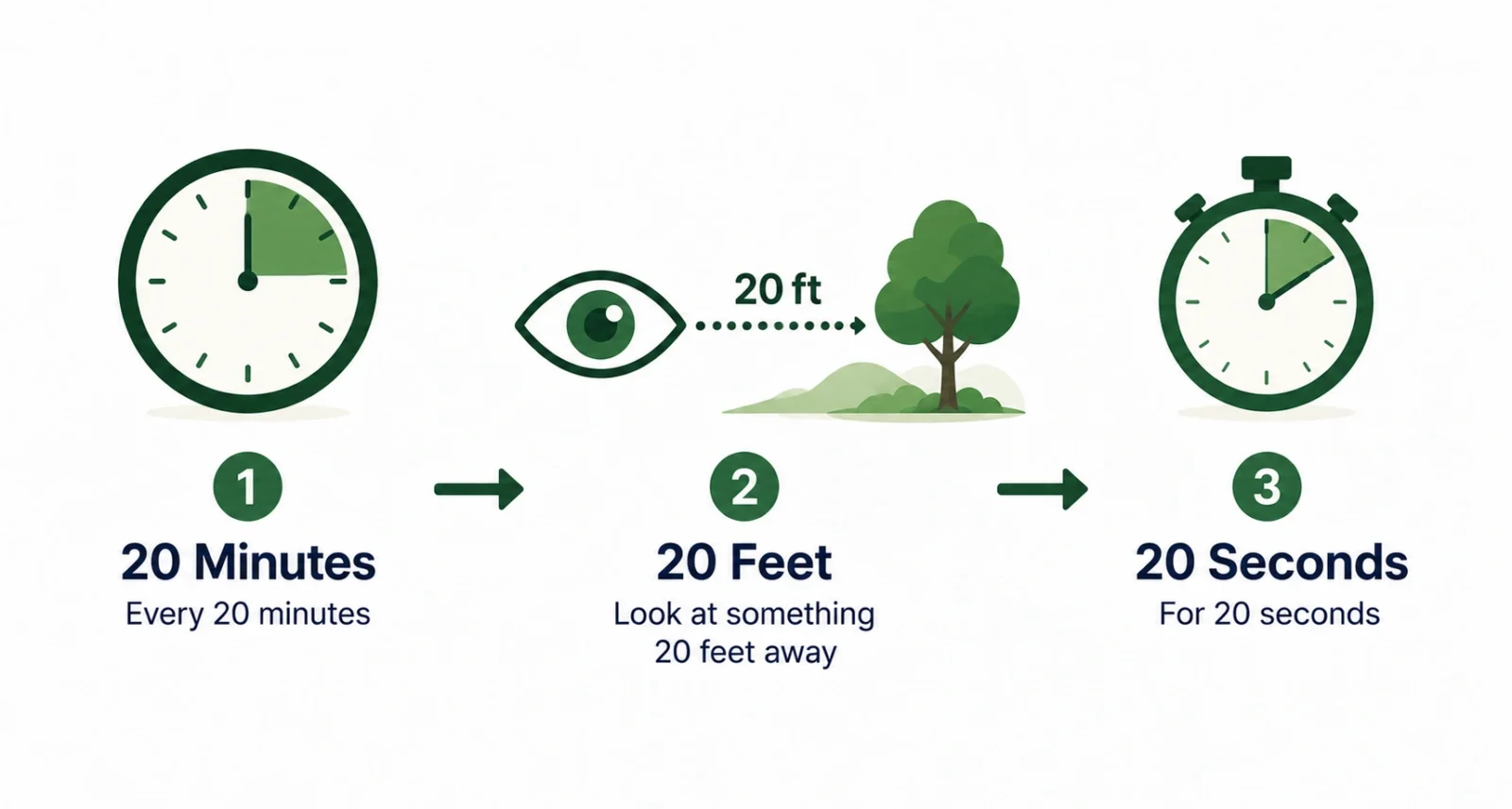
Cutting back on screens helps, but you cannot avoid them entirely. So while you are looking, give your eyes some care. The single best habit is the 20-20-20 rule, endorsed by eye doctors everywhere: every 20 minutes, look at something at least 20 feet away for at least 20 seconds. It gives your eyes a chance to relax and refocus. A few more simple adjustments go a long way, many recommended by the Mayo Clinic.
| Adjustment | What to Do |
| Distance | Keep the screen about an arm’s length away, roughly 20 to 28 inches |
| Position | Set the top of the screen at or just below eye level |
| Brightness | Match your screen brightness to the light in the room |
| Glare | Reduce glare from windows and overhead lights |
| Text size | Enlarge text so you are not leaning in to read |
| Breaks | Follow the 20-20-20 rule throughout the day |
Two more quick tips: blink on purpose to keep your eyes moist, and if they still feel dry, over-the-counter artificial tears can help.
The Truth About Blue Light
You have probably seen ads for glasses that block blue light, promising to rescue your eyes from screens. Here is what the science actually says. According to the American Academy of Ophthalmology, there is no evidence that blue light from screens damages your eyes, and the group does not recommend blue light glasses for that purpose. The discomfort you feel is digital eye strain, caused by how you use screens, not by the blue light itself. There is one real catch, though. Blue light in the evening can interfere with your body clock and make it harder to fall asleep, which is a great reason to power down before bed.
When to See an Eye Doctor
Most eye strain clears up on its own once you rest your eyes and adjust your habits. Still, do not ignore symptoms that stick around. As Cleveland Clinic notes, if your eye discomfort does not improve with lifestyle changes, it could point to an underlying issue that needs treatment. Book a comprehensive eye exam if you have lasting blurred vision, frequent headaches, or eye pain. Regular checkups are also the best way to catch problems early, whether or not screens are to blame.
Learning how to reduce screen time is not about giving up your devices. It is about using them with intention, so they work for you instead of the other way around. Start with one small change, like the 20-20-20 rule or a phone-free bedroom, and build from there.
Your eyes, your sleep, and your free time will all thank you. In a world full of screens, a little balance goes a long way.
Frequently Asked Questions
How much screen time is too much?
There is no single magic number for adults, but eye strain becomes more likely beyond about six hours of screen use a day without breaks. What matters most is taking regular breaks and being intentional, rather than hitting an exact limit.
What is the 20-20-20 rule?
The 20-20-20 rule is a simple way to rest your eyes. Every 20 minutes, look at something at least 20 feet away for at least 20 seconds. Eye doctors recommend it because it lets your eye muscles relax and refocus.
Do blue light glasses actually work?
For protecting your eyes from screen damage, no. The American Academy of Ophthalmology says there is no evidence that blue light from screens harms your eyes, and it does not recommend blue light glasses. Good screen habits and breaks matter far more.
How can I reduce screen time on my phone?
Start by checking your screen time stats, then set app limits, turn off nonessential notifications, and keep your phone out of the bedroom. Switching to grayscale and leaving the phone in another room also make it far less tempting.
Can screens permanently damage your eyes?
No. Staring at screens can cause temporary eye strain and dry eyes, but it does not cause permanent damage. The symptoms are uncomfortable yet reversible, and they ease once you rest your eyes and adjust your habits.
Why do my eyes feel dry after using screens?
Because you blink much less when looking at a screen, sometimes a third as often as usual. Blinking keeps your eyes moist, so blinking on purpose and using artificial tears can relieve that dry, gritty feeling.