

You step off a long flight excited to explore, and your body simply refuses to cooperate. Jetlag can swallow the first days of any trip. Now Google’s AI wants to fix that. The Gemini app can read your flight details, build a personalized plan, and drop it straight into your calendar. This guide shows you exactly how to avoid jetlag with Gemini, step by step, plus the science-backed habits that make it work.
| Quick Answer To avoid jetlag with Gemini, open the Gemini app, give it permission to access your Gmail and Calendar, then ask it to help you beat jetlag for your upcoming trip. Powered by the Gemini 3.5 Flash model, it finds your flight details, builds a jetlag-proof schedule of sleep, light, and meal timing, and can add that plan to your calendar. Pair it with proven habits, shifting your sleep before you fly, timing light exposure, and staying hydrated, for the best results. |
Key Takeaways
- The Gemini app can build a personalized jetlag plan from your real flight details.
- It uses your Gmail and Calendar, with your permission, then adds the schedule to your calendar.
- The feature runs on the Gemini 3.5 Flash model, which combines reasoning with action.
- Jetlag is worst when crossing three or more time zones, and eastward trips are usually harder.
- The proven fixes are timed light exposure, gradual sleep shifts, and hydration.
What Causes Jetlag?
Jetlag happens when your body clock, the internal rhythm that tells you when to sleep and wake, falls out of sync with the time at your destination. Fly across several time zones quickly, and your body still thinks it is back home. The result is poor sleep, daytime fog, low energy, and a cranky stomach.
According to the Sleep Foundation, crossing more than three time zones makes jetlag much more likely, and the more zones you cross, the worse it gets. Direction matters too: for most people, traveling east is harder than traveling west, because it forces your clock earlier rather than later.
| Worth Knowing Jetlag is not just tiredness from a long flight. It is a genuine mismatch between your internal clock and local time, which is why simply sleeping more does not fully fix it. Shifting the clock itself is the real solution. |
How Gemini Helps You Avoid Jetlag
Building a good jetlag plan by hand is fiddly. You have to know your exact flight times, work out the time difference, and figure out when to sleep, seek light, and eat. The simplest way to avoid jetlag with Gemini is to let it do that heavy lifting for you.
Once you give it permission to access your Gmail and Calendar, the Gemini app finds your flight information automatically, creates a jetlag-proof schedule, and can add that itinerary to your calendar. As Google explained on its blog, this is powered by the Gemini 3.5 Flash model, which pairs strong reasoning with the ability to take action for you.
- Finds your flight. It reads the booking confirmation in your inbox, so you do not type in any times.
- Builds the plan. It creates a personalized schedule of sleep, light, and timing around your real trip.
- Adds it to your calendar. With a tap, the plan lands in your calendar as reminders you can actually follow.
Step by Step: Avoid Jetlag With Gemini in the App
Here is the simple path from install to a ready-made plan. The whole thing takes only a few minutes.
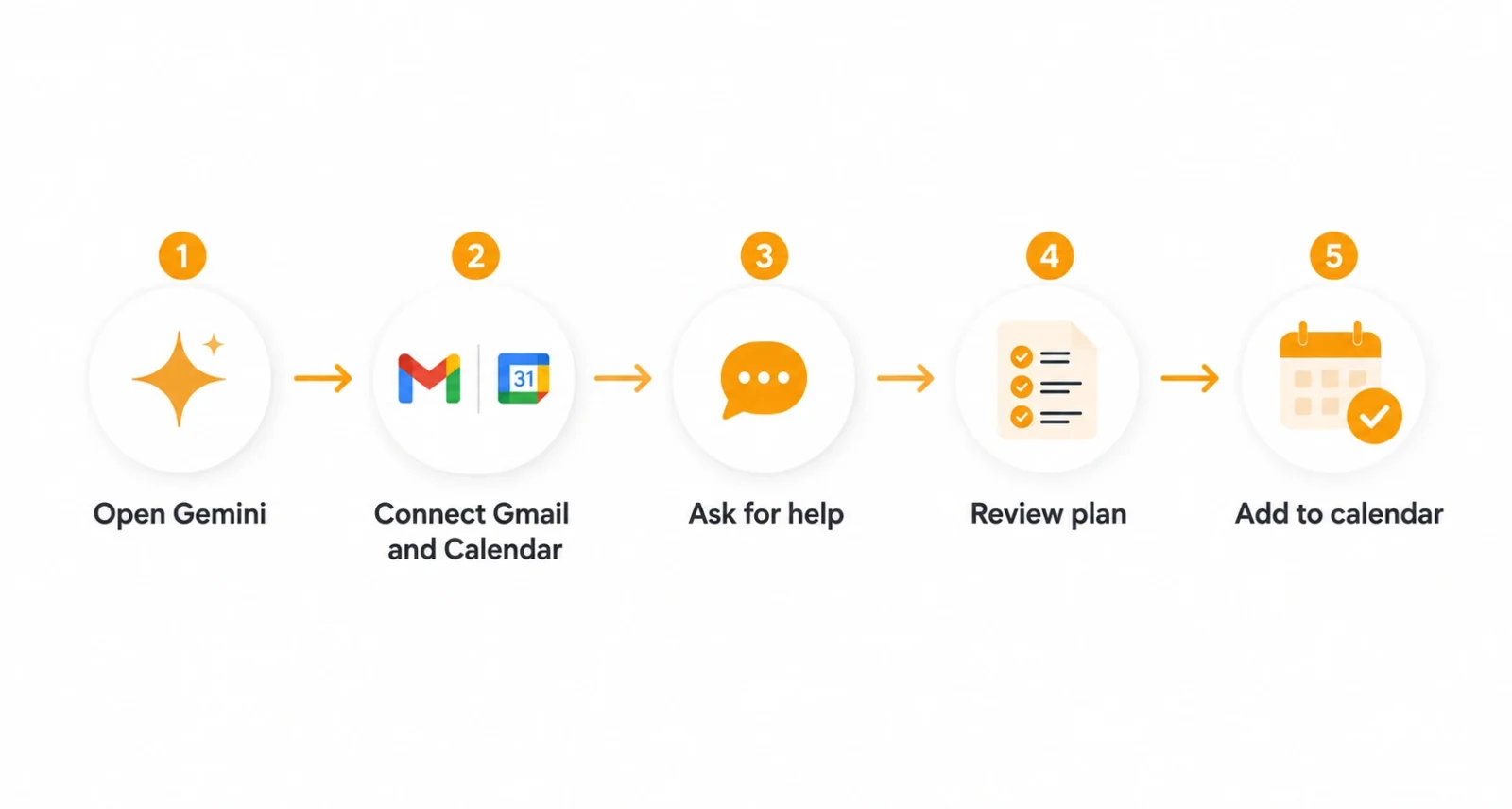
- Open the Gemini app. Install or open Gemini on your phone and sign in with the Google account that holds your travel emails.
- Grant Gmail and Calendar access. When prompted, give Gemini permission to connect to your Gmail and Calendar. This is what lets it find your flight.
- Ask for jetlag help. Tell it something like, help me avoid jetlag for my upcoming trip. It will pull the flight details on its own.
- Review the schedule. Gemini builds a plan of when to sleep, seek or avoid light, and adjust. Read it over and ask for tweaks if needed.
- Add it to your calendar. Confirm, and Gemini drops the plan into your calendar as timed reminders you can follow day by day.
| Quick Tip Make sure your flight confirmation email is in the connected Gmail inbox before you start. If Gemini cannot find a booking, you can also just tell it your route and dates, and it will build the plan from there. |
What a Gemini Jetlag Plan Looks Like
A good plan covers the days before you fly, the flight itself, and your first days at the destination. Gemini tailors the exact times to your trip, but the shape usually looks like this.
| When | What the Plan Suggests |
| Few days before | Shift your sleep slightly toward destination time |
| On the plane | Set your watch to destination time, sleep on their night |
| On arrival | Get or avoid light at specific times to reset your clock |
| First days there | Keep meals, light, and sleep aligned with local time |
Because the plan lives in your calendar, you get gentle nudges at the right moments, when to wind down, when to step into the sun, and when to power through. No mental math required.
The Science That Makes It Work
Why does a schedule of sleep and light beat jetlag? Because light is the most powerful signal for your body clock. Used at the right time, it can shift your rhythm earlier or later, which is exactly what crossing time zones requires. Health authorities like the Sleep Foundation and the CDC point to timed light and gradual sleep shifts as the core of any real jetlag plan.
- Shift early. In the days before the trip, nudge your bedtime toward destination time, often about an hour a day.
- Use light wisely. Morning sunlight tends to shift you earlier for eastward trips, evening light shifts you later for westward ones.
- Avoid light too. Skipping light at the wrong time matters as much as getting it at the right time.
- Stay hydrated. Drinking water and easing off alcohol helps with the physical side of jetlag, per CDC guidance.
Gemini handles the tricky timing for you, but knowing the why helps you trust and stick to the plan. This is the same reasoning-plus-action approach showing up across Google’s AI. Our guide to how to use Google AI Mode covers the wider shift toward AI that does more than answer questions.
Extra Tips for an Easy Arrival
A few simple habits stack neatly on top of your Gemini plan and make the first days smoother.
- Switch your watch early. Set your phone and watch to destination time as you board to start thinking in the new zone.
- Nap smart. If you must nap on arrival, keep it short, around 20 to 30 minutes, so it does not wreck your night.
- Get morning movement. A short walk in daylight helps anchor your clock to local time and lifts energy.
- Plan light first days. Avoid scheduling anything critical for the first day, since your sharpness may still be catching up.
If you track your sleep, a wearable can show how well you are adjusting. Our Fitbit Air review covers one option built for exactly this kind of sleep tracking on the go.
A Note on Melatonin and Safety
Many jetlag plans mention melatonin, a hormone your body makes to signal night. Taken in a low dose at the right time, it can help nudge your clock, but timing and safety matter.
| Health Disclaimer Melatonin is not tightly regulated, so the actual dose can differ from the label, and it can cause grogginess or interact with other medicines. Do not try it for the first time on the plane. Speak with your doctor before using melatonin, especially if you take other medications or have a health condition. This article is general information, not medical advice. |
Gemini can build the schedule, but it is not a doctor. For anything beyond simple sleep and light timing, or if jetlag seriously affects you, a healthcare professional is the right source. Treat the app as a smart planner, not a medical authority.
Learning to avoid jetlag with Gemini is one of the more genuinely useful AI tricks to land this year. Instead of guessing, you get a personalized plan built from your real flight, dropped right into your calendar, grounded in the same light and sleep science the experts recommend.
Set it up before your next big trip, follow the gentle reminders, and add a few smart habits like timed light and good hydration. You may just arrive ready to explore, instead of ready for bed.
| Your Move Want more clear guides on Google’s AI tools? Browse our Technology section for practical, easy-to-follow reads. |

