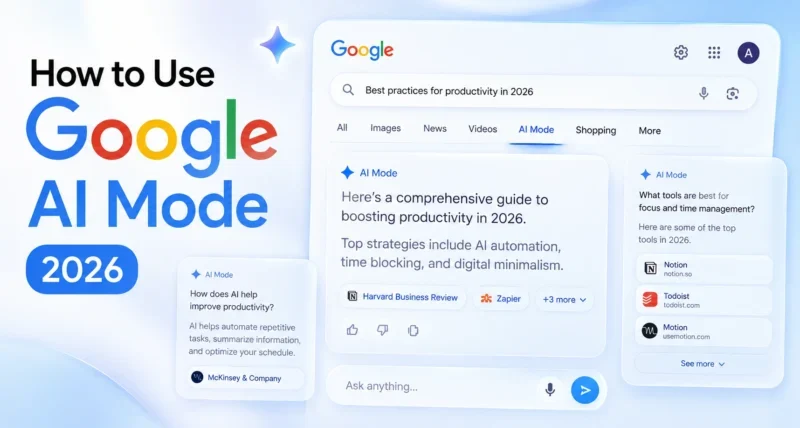
To use Google AI Mode, open google.com on desktop or the Google app on your phone, then click the “AI Mode” tab next to All, Images, and Videos. Type any complex question in plain English, and Google’s Gemini powered AI will give you a conversational answer with inline source links. Follow up questions keep the context of the conversation.
Key Takeaways
- Google AI Mode is a dedicated search tab powered by Gemini that gives conversational, fully cited answers
- It is free for all US users with no Labs sign up needed since May 2025
- A major May 6, 2026 update brought inline links, hover previews, and community perspectives
- Around 50% of US searches now generate AI Overviews or AI Mode responses
- The trick most people miss: AI Mode remembers your conversation context across follow up questions
What Is Google AI Mode?
Google AI Mode is a dedicated search experience powered by a custom version of Gemini, Google’s most capable AI model. Unlike regular search that returns a list of blue links, AI Mode reads your question, runs many searches behind the scenes, and writes a complete conversational answer with sources cited inline.
The May 6, 2026, update made AI Mode even more useful by placing source links right next to specific facts in the response, adding website previews on hover, and surfacing perspectives from Reddit, forums, and social media alongside the AI summary.
If you want a broader view of how Google is rebuilding its AI stack, our piece on Gmail AI Updates 2026 covers another major part of the same shift.
How Do You Use Google AI Mode?
To use Google AI Mode, open Google.com or the Google app, click or tap the AI Mode tab next to All, Images, and News, type a question in plain English, and read the conversational answer with citations. You can then ask follow-up questions, upload images, or even use your camera with Search Live to get richer responses.
How to Access Google AI Mode on Every Device
The setup is the same idea on each device, but the buttons are in different places. Here is the path for each.
On Desktop (Chrome, Safari, Edge, Firefox)
1. Open google.com in your browser
2. Look at the tabs above the results (All, Images, Videos, News, Shopping)
3. Click the AI Mode tab on the far left
4. Type your question in plain English
5. Press Enter and read the answer
On Mobile (Android and iPhone)
1. Open the Google app on your phone
2. Tap the AI Mode button right under the search bar on the home screen
3. Type or speak your question
4. Read the response and tap any inline link to dive deeper
Inside Chrome Desktop (New Side-by-Side View)
As of May 5, 2026, AI Mode works inside any Chrome tab. Open Chrome on desktop, type your question in the address bar, switch to AI Mode, and clicking a link will now open the source page side by side with the AI Mode panel. You can also add open tabs to your search context using the plus menu.
Quick Tip: If you do not see the AI Mode tab, your account or region may not have access yet. Visit Google Search Labs at g.co/labs and opt in to the AI Mode experiment.

What’s New in Google AI Mode (May 2026 Update)
On May 6, 2026, Google rolled out five major updates to AI Mode and AI Overviews. These changes are why AI Mode searches feel much more useful right now than even three months ago.
- Inline Source Links. Citations now appear directly next to the relevant text in the response, not buried at the bottom. If a bullet point talks about coastal terrain on a bike trip, you see the link to that exact guide right beside the bullet.
- Hover Previews on Desktop. Hovering over an inline link shows the website name and page title before you click. This solves the “is this site any good” problem in one tiny preview.
- News Subscription Highlights. AI Mode now highlights links from sources you already subscribe to. Early Google testing found users click subscribed source links far more often than generic ones.
- Community Perspectives. AI responses now include quotes from Reddit threads, forums, and social posts, labeled with the creator’s name or community. This adds real human experience to AI summaries.
- Explore More Section. At the end of every AI response, a new section suggests follow-up angles with links to in-depth articles, case studies, or reports. This makes AI Mode feel less like a dead end and more like the start of a research session.
How Google AI Mode Compares to ChatGPT, Perplexity, and Bing Copilot
This is the comparison most users actually want before they commit to one. Here is the honest side-by-side.
| Feature | Google AI Mode | ChatGPT (with Search) | Perplexity | Bing Copilot |
| Free to use | ✅ Yes (US) | ⚠️ Limited free tier | ✅ Yes (limited) | ✅ Yes |
| Underlying model | Gemini 2.5 / 3 | GPT-5.5 | Claude, GPT, Sonar | GPT-5 |
| Inline source citations | ✅ Yes (May 2026) | ✅ Yes | ✅ Yes | ✅ Yes |
| Conversational follow-ups | ✅ Yes | ✅ Yes | ✅ Yes | ✅ Yes |
| Camera input (live search) | ✅ Yes (Search Live) | ✅ Yes (Advanced Voice) | ❌ No | ⚠️ Limited |
| Personalization (your data) | ✅ Yes (Pro/Ultra) | ✅ Yes (Memory) | ⚠️ Limited | ⚠️ Limited |
| Image and video search | ✅ Yes | ✅ Yes | ✅ Yes | ✅ Yes |
| Best for | Daily search with sources | Long form reasoning | Research and academic | Office and Microsoft work |
Insight Box: Adobe data shows AI-driven traffic to US retailers grew 393% year over year in Q1 2026, and those AI visitors spend 48% longer on site and generate 37% more revenue per visit than other traffic. AI search is no longer a side product. It is becoming the default way people find things online.
The Best Prompts to Try in Google AI Mode
Most beginners type the same one or two-word queries they used in the old Google Search. That is the fastest way to waste AI Mode. The real power comes from asking the kind of question you would ask a smart friend.
Research prompts that work well: – “Compare the top 5 noise-canceling headphones under $300 by sound quality, comfort, and battery life. Build a table.” – “I am visiting Tokyo for 4 days in October with two young kids. Build me a daily plan with budget options.” – “Explain the difference between a Roth IRA and a 401 (k) for someone in their 30s in the US in plain English.”
Local prompts: – “Best brunch spots near me with outdoor seating and vegetarian options.” – “Walking trails within 30 minutes of my location that are dog-friendly and under 3 miles.”
Decision prompts: – “Should I get an iPhone 17 Pro or wait for the iPhone 18? List the rumored differences.” – “My laptop is 5 years old and getting slow. Is it worth upgrading or should I buy new?”
Visual prompts (use Search Live or upload): – Point your camera at a plant: “What plant is this and how often should I water it?” – Snap a photo of an outfit: “Find shoes that would go with this color and style.”
For more practical AI prompt ideas you can use today, see our guide to the best free AI tools for students.
7 Tips to Get Better Results from Google AI Mode
The difference between a frustrating AI Mode session and a great one comes down to how you ask.
- Use full sentences, not keywords. “Vacuum cleaner for pet hair under $300 that is quiet” beats “best vacuum pet hair.”
- Ask follow-up questions instead of restarting. AI Mode keeps the context of your conversation. If you asked about Tokyo trip ideas, your next question can just be “Which of those are best for rainy days?”
- Tell them your situation. Mention your budget, location, age range, skill level, or constraints. The more context you give, the more useful the answer.
- Ask for the format you want. Add phrases like “build me a table,” “give me bullet points,” or “compare in a list” at the end of your prompt.
- Use the Explore More links. The bottom section of every AI Mode response now suggests follow up angles. These are gold for research.
- Try Search Live for visual problems. Point your camera at a math problem, a recipe, a broken appliance, or a plant. Search Live can talk you through it in real time.
- Connect Gmail and Photos for Pro users. If you have a Google AI Pro or Ultra subscription, turning on Personal Intelligence lets AI Mode pull from your emails, travel bookings, and photo library for context aware answers.
Limitations of Google AI Mode (What It Cannot Do in 2026)
AI Mode is impressive but not magic. Knowing the limits keeps you from wasting time.
It can still hallucinate. AI Mode pulls from real sources, but it sometimes mixes up details or pulls outdated info. Always click through to the source for anything important.
Personal Intelligence is paid and US only. The Gmail and Photos integration requires a Google AI Pro or AI Ultra subscription and currently works only in the US in English.
It does not always show the same answer twice. AI responses are generated fresh each time, so two people asking the exact same question can get different answers.
News and breaking events are slow. For real-time updates like sports scores, stock prices, or live news, traditional search still wins.
Privacy trade-offs matter. Personal Intelligence can reference years of email and photo data. If that worries you, leave it off.
Myths vs Facts About Google AI Mode
| Myth | Fact |
| Google AI Mode replaces regular Google Search. | No. AI Mode is a separate tab. Regular search still works the same way next to it. |
| You need a paid subscription to use AI Mode. | No. The core experience is free for all US users. Only Personal Intelligence and Deep Search need a paid plan. |
| AI Mode shows the same answer to everyone. | No. Answers are generated fresh each time and can vary based on phrasing and context. |
| AI Mode kills website traffic. | Mixed. Adobe data shows AI-driven traffic to retailers grew 393% in Q1 2026, with much higher engagement per visit than other sources. |
Should You Switch to Google AI Mode?
If you regularly use Google for anything beyond a quick fact lookup, AI Mode is worth a real trial run. Try it for a full week on the kinds of searches that used to take you 5 or 10 tabs to answer, like trip planning, product comparisons, or learning a new topic. The May 2026 update fixed most of the early complaints about missing sources and now feels like a true upgrade rather than a side experiment.
Frequently Asked Questions
Is Google AI Mode free?
Yes, AI Mode is free for all US users with no Labs sign-up needed.
Which countries have Google AI Mode?
AI Mode launched in the US first and is expanding to more countries through 2026.
Do I need a Google account to use AI Mode?
No, you can use basic AI Mode without signing in, but personalization requires a Google account.
What model powers Google AI Mode?
A custom version of Gemini 2.5, with parts of the experience now running on Gemini 3.
Can I turn off AI Mode and AI Overviews?
Not officially, but you can switch to the regular All tab or use Web search filters to skip AI summaries.
Is Google AI Mode better than ChatGPT for search?
For real-time search with sources, AI Mode is often faster and better cited; ChatGPT is stronger for long-form reasoning and writing.
Does AI Mode work with my voice?
Yes, the Google app supports voice queries in AI Mode, and the new Search Live feature adds a back-and-forth conversation through your camera.