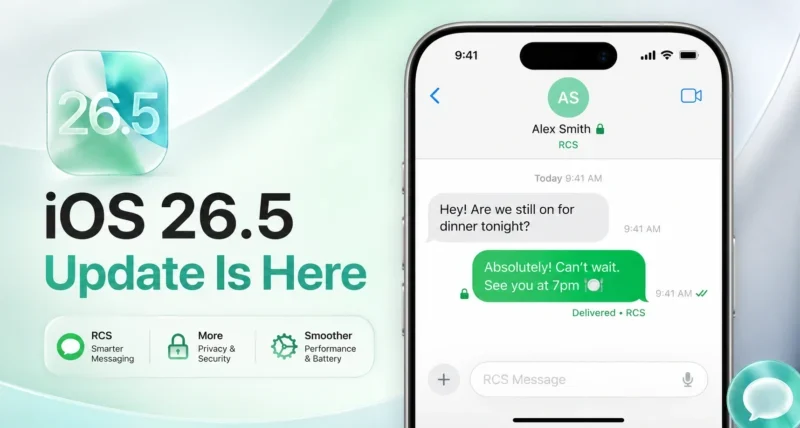
Apple released the iOS 26.5 update on May 11, 2026, bringing end to end encrypted RCS messaging in beta as the headline feature. iPhone users can now exchange fully encrypted texts, photos, and videos with Android users on Google Messages, marked by a new lock icon in chats. Encryption is on by default for supported carriers.
Key Takeaways
- The iOS 26.5 update rolled out on May 11, 2026, with end to end encrypted RCS messaging as the main new feature
- A new lock icon in your chat indicates that the conversation is fully encrypted
- The feature is on by default for new and existing chats with Android users on Google Messages
- Works only with supported carriers, so coverage will expand gradually
- iMessage is still the most secure way to text between Apple devices
What’s New in the iOS 26.5 Update?
The iOS 26.5 update brings end to end encrypted RCS messaging in beta as its main new feature. iPhone users can now send fully encrypted texts, photos, and videos to Android users on Google Messages. A new lock icon appears in chats when encryption is active, and the feature is on by default for supported carriers.
This is the first time in messaging history that texts between iPhone and Android can be truly private from carriers, hackers, and even Apple or Google themselves. For over a decade, the “green bubble vs blue bubble” debate has been about more than color. It has been about security. iOS 26.5 changes that.
Why the iOS 26.5 Update Matters
For years, messages between iPhone and Android users have traveled over older SMS rails that anyone with the right tools could intercept. iMessage was always end-to-end encrypted, but that protection ended the moment a green bubble appeared.
Apple and Google have been working together with the GSM Association (GSMA) since early 2025 to fix this gap. The iOS 26.5 update is the public payoff of that work.
According to Apple’s official newsroom announcement, the rollout uses the open RCS Universal Profile, which means no single company controls the encryption. That open standard matters because it makes the feature available to every Android user on the latest Google Messages, too, not just iPhone owners.
If you want a deeper look at the broader Apple vs Android ecosystem race, our piece on Samsung vs Apple: The Real Difference in Power, Technology, and Global Influence covers the bigger picture.
How Does End-to-End Encrypted RCS Work in iOS 26.5?
End-to-end encryption means the message is scrambled on your device before it leaves, travels through the network as unreadable code, and only gets unscrambled on the recipient’s device. Not even your carrier, Apple, or Google can read it in transit.
In iOS 26.5, the system works like this:
- You type a message in the iPhone Messages app
- The phone encrypts the message locally using cryptographic keys stored only on your device
- The encrypted message travels through the RCS network to the recipient
- The recipient’s phone (iPhone or Android on Google Messages) decrypts it using its own private key
- Both sides see a lock icon next to the chat name, confirming the encryption is active
You don’t have to install anything, toggle a setting, or download a new app. The encryption activates automatically once you and the other person both have supported devices, supported carriers, and the latest software.

How to Install the iOS 26.5 Update on Your iPhone
The update is rolling out gradually, so you may not see it instantly. Here is how to check and install it.
Steps – 1: Open the Settings app on your iPhone
2: Tap General
3: Tap Software Update
4: If iOS 26.5 is available, you will see it listed. Tap Download and Install
5: Enter your passcode and agree to the terms
6: Wait for the update to download. This takes 5 to 20 minutes, depending on your connection
7: Your iPhone will restart automatically when ready
Quick Tip: Before updating, plug your iPhone into power, connect to Wi-Fi, and make sure you have at least 50% battery and 5 GB of free storage. Back up to iCloud first if you can.
How to Check If Your RCS Chat Is Encrypted
This is the part most users want to know. The signal is simple but easy to miss.
- Open the Messages app on iPhone
- Tap an RCS conversation with an Android user (the chat bubble will be green, not blue)
- Look next to the contact name at the top
- If you see a small lock icon, the chat is end-to-end encrypted
- If there is no lock icon, encryption has not been activated yet for that chat
If the lock icon does not appear, it usually means one of three things: your carrier does not yet support encrypted RCS, the other person’s carrier or app version is not ready, or the chat is still being upgraded automatically in the background.
iMessage chats (blue bubbles between Apple devices) do not show a new lock icon because they have always been encrypted. Apple confirmed in its newsroom that iMessage remains the most secure way to communicate between Apple devices.
Which Carriers Support iOS 26.5 Encrypted RCS?
This is where things get less clean. Apple has only enabled encrypted RCS for users on supported carriers, and the list is rolling out gradually. Forbes reporting on the launch noted that the feature is “not available for all” iPhone users at the start, which is the main caveat to be aware of.
To check whether your carrier supports encrypted RCS:
- Visit Apple’s official supported carriers list
- Search for your country and carrier name
- If your carrier is listed, encryption will activate automatically as the rollout reaches you
Major US carriers, including T-Mobile, AT&T, and Verizon, are expected to be among the first supported, with UK and EU carriers following in the coming weeks. International coverage will expand throughout 2026.
iOS 26.5 Encrypted RCS vs iMessage vs WhatsApp vs Signal
Now that encrypted RCS exists, the question many users are asking is which messaging option is actually the most private. Here is a clear side-by-side.
| Feature | iOS 26.5 Encrypted RCS | iMessage | Signal | |
| End-to-end encryption | ✅ Yes (beta) | ✅ Yes | ✅ Yes | ✅ Yes |
| Works between iPhone and Android | ✅ Yes | ❌ No | ✅ Yes | ✅ Yes |
| Requires phone number | ✅ Yes | ✅ Yes | ✅ Yes | ✅ Yes |
| Requires a separate app | ❌ No | ❌ No | ✅ Yes | ✅ Yes |
| Metadata collected | Some (carrier) | Some (Apple) | More (Meta) | Almost none |
| File and photo support | ✅ High res | ✅ High res | ✅ High res | ✅ High res |
| Read receipts and typing indicators | ✅ Yes | ✅ Yes | ✅ Yes | ⚠️ Optional |
| Group chat encryption | ⚠️ Gradual rollout | ✅ Yes | ✅ Yes | ✅ Yes |
| Best for | Default texting iPhone to Android | iPhone to iPhone | Global friends and family | Maximum privacy |
Insight Box: For most people, iOS 26.5 encrypted RCS will replace the need for a separate app like WhatsApp for basic Android friends. But if privacy is your top priority, Signal still wins because it collects almost no metadata.
Limitations of the iOS 26.5 Update You Should Know
Three things are worth flagging before you celebrate.
It is in beta. Apple was careful to call this a beta rollout. Things may break or look inconsistent during the first few weeks.
Not every carrier supports it yet. Even after you install iOS 26.5, encrypted RCS will only activate when your carrier flips the switch. Smaller regional carriers may take months.
It only protects the message in transit. End-to-end encryption stops people from intercepting your message as it travels. It does not stop someone with physical access to your phone, or with your iCloud or Google account, from reading the messages once they arrive.
For more on how privacy regulations and standards keep evolving in tech, our piece on Artificial Intelligence Ethics and Regulation covers the legal side of this fast-moving space.
Myths vs Facts About the iOS 26.5 Update
| Myth | Fact |
| The iOS 26.5 update turns every text into an iMessage. | No. Texts between iPhone and Android still appear as green bubbles. They are just encrypted now. |
| You need to download a new app to use encrypted RCS. | No. The feature is built into the Messages app and activates automatically. |
| Encrypted RCS replaces iMessage. | No. iMessage between Apple devices is still separate and remains the most secure Apple option. |
| Everyone gets encrypted RCS immediately after updating. | No. Both users need supported carriers, supported devices, and the latest software. |
Final Thoughts: Should You Update to iOS 26.5 Now?
If you text any Android user regularly, the answer is yes. iOS 26.5 is the most meaningful upgrade to iPhone messaging in over a decade. The lock icon may look small, but it represents the end of a long-standing gap that affected billions of cross-platform messages every day.
The update is free, takes around 15 minutes to install, and brings real privacy gains. Just remember that the rollout is gradual. If you do not see the lock icon right away, your carrier is probably still being onboarded
Ready to update your iPhone? Open Settings > General > Software Update and tap Download and Install. Then text your favorite Android friend and watch for the lock icon to appear.
Frequently Asked Questions
When was iOS 26.5 released?
Apple released iOS 26.5 on May 11, 2026, with a gradual rollout over the first 24 to 72 hours.
Which iPhones support iOS 26.5?
The iOS 26.5 update works on iPhone 11 and later, iPhone SE second and third generation, and all iPhone 17 models.
Is the encrypted RCS in iOS 26.5 safe to use?
Yes, but it is in beta, so high-risk users should still prefer Signal for maximum privacy.
Do both people need iOS 26.5 for encryption to work?
No, the iPhone user needs iOS 26.5, and the Android user just needs the latest Google Messages on a supported carrier.
Will my old RCS chats be encrypted too?
Yes, Apple confirmed that both new and existing RCS chats will receive automatic encryption over time.
Can I turn off encrypted RCS in iOS 26.5?
No, Apple does not offer a toggle to disable encryption in iOS 26.5.
Does iOS 26.5 affect battery life?
Most users see normal battery life within 48 hours after the install completes its background indexing.