
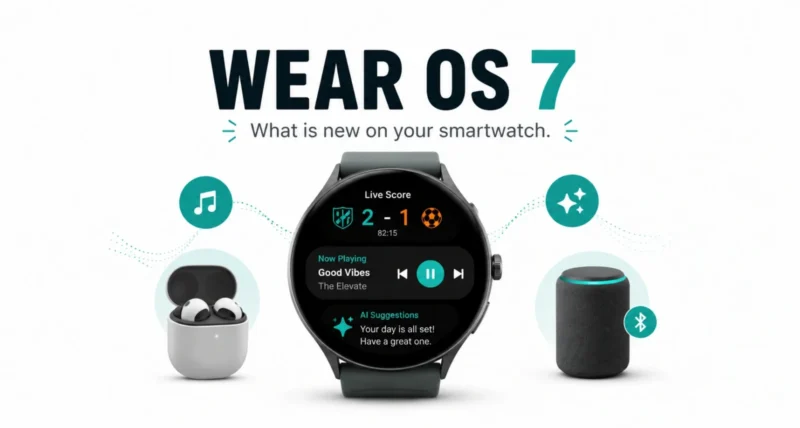
If you wear your smartwatch all day, every day, you are far from alone. More than half of Wear OS users strap one on seven days a week. The keenest wear it over 23 hours a day. Now Google has announced Wear OS 7, the biggest update in a while, rolling out to eligible Pixel Watch devices today. Here are the four upgrades worth knowing, explained simply.
| Quick Answer Wear OS 7 is rolling out to eligible Pixel Watch devices now. It adds four key upgrades: Live Updates that track scores, food orders, and workouts on your wrist, easy control of your other devices and media, Gemini Intelligence features coming later this year, and up to 10 percent better battery life. It is a free software update. |
What Is Wear OS 7
Wear OS 7 is the latest version of Google’s smartwatch software, the system that powers Pixel Watch and many other Android watches. Think of it as the watch equivalent of a phone update. Same hardware, but new features, a smoother experience, and better battery life once you install it.
It is rolling out to eligible Pixel Watch devices first, with more watches to follow. Below are the four upgrades that actually change how you use your watch day to day.
| Why It Matters Your watch is the device you glance at dozens of times a day. Small improvements to what it shows and how long it lasts add up fast, which is exactly where Wear OS 7 focuses. |
Feature 1: Live Updates on Your Wrist
The first upgrade is the one you will use most. Wear OS 7 brings Live Updates straight to your watch face, so you can follow something happening in real time without pulling out your phone.
Want the score of the big game, your food delivery time, or your live workout progress? It all appears at a glance, updating as things change. It is the kind of small, useful touch that makes a watch feel genuinely helpful.
| The Cool Part No more pulling your phone out to check if your takeaway is two minutes or twenty minutes away. A quick glance at your wrist shows the live countdown, right there. |
Feature 2: Control Your Other Devices From Your Watch
Wear OS 7 is built to work smoothly with the gadgets around you. Your watch becomes a little remote control for your wider tech.
- Manage your music anywhere. Control what is playing on your headphones, home speakers, and more. You can also switch audio between devices with the media output switcher.
- Pair with smart eyewear. If you snap a photo on audio glasses, you can review it instantly with a glance at your watch.
- Stay in control hands-free. It keeps your connected devices working together, so you fiddle with your phone less.
Feature 3: Gemini Intelligence, Coming Later This Year
This is the upgrade to get excited about. Later this year, select Wear OS 7 devices will gain Gemini Intelligence features that make your watch genuinely smarter and more personal.
- Create My Widget. Build a custom dashboard for your watch just by describing what you want in plain words.
- Multi-step automation. Ask Gemini to handle a task end to end, like reserving your spin class bike or ordering your usual from a favorite restaurant.
- Personal Intelligence. It can reference your Google apps, like Gmail and Search, to offer suggestions that are genuinely useful to you.
| Heads Up Gemini Intelligence is not available on day one. It arrives later this year and only on select Wear OS 7 devices, so check whether your watch is on the list when it launches. |
Feature 4: Up to 10 Percent Better Battery Life
New features usually drain a battery faster. Wear OS 7 does the opposite. Thanks to deep, system-level power tuning, the update actually extends how long your watch lasts.
Average users upgrading from Wear OS 6 can expect up to a 10 percent improvement in battery life. That means more new features and more time between charges, a rare and welcome combination.
Wear OS 7 Features at a Glance
| Feature | What It Means for You |
| Live Updates | Track scores, food orders, and workouts on your wrist in real time |
| Device control | Manage music and connected gadgets from your watch |
| Gemini Intelligence | Custom widgets, task automation, and personal suggestions, later this year |
| Battery life | Up to 10 percent longer on a single charge |
How to Get Wear OS 7 on Your Watch
Updating is simple and free. If your watch is eligible, here is how to install it.
- Charge your watch to at least 50 percent and keep it on the charger.
- Open the Settings app on your watch, then go to System and tap System updates.
- Tap to download and install if Wear OS 7 is available for your device.
- Let the watch restart. The update installs on its own, and your watch will reboot when it is done.
| Quick Tip If you do not see the update yet, do not worry. Rollouts happen in waves over days or weeks, so check back, and make sure your watch is one of the eligible Pixel Watch models. |
Wear OS 7 is a smart, practical update that makes your smartwatch more useful without making you charge it more often. Live Updates and easy device control help right away. Gemini Intelligence promises even more later this year, and the battery boost ties it all together. If you have an eligible Pixel Watch, it is an easy free upgrade worth grabbing. You can read the official details in Google’s announcement.
Frequently Asked Questions
What Is Wear OS 7
Wear OS 7 is the newest version of Google’s smartwatch software. It adds Live Updates, better device control, upcoming Gemini Intelligence, and improved battery life.
Is Wear OS 7 Free
Yes. Wear OS 7 is a free software update for eligible watches, just like a phone software update.
Which Watches Get Wear OS 7
It is rolling out to eligible Pixel Watch devices first, with more Wear OS watches expected to follow over time.
When Will Gemini Intelligence Arrive
Gemini Intelligence features are coming later this year to select Wear OS 7 devices, not at the initial launch.
Does Wear OS 7 Improve Battery Life
Yes. Average users upgrading from Wear OS 6 can expect up to a 10 percent improvement in battery life thanks to system-level power tuning.
How Do I Update to Wear OS 7
Charge your watch and open Settings. Go to System, then System updates, and download it if available for your device.

